We will talk about these and other issues in the following sections.
11.1. Setting the MaxClients Directive
It's important to specify
MaxClients on the basis of the resources
your machine has. The MaxClients directive sets
the limit on the number of simultaneous
requests that can be supported. No
more than this number of child server processes will be created. To
configure more than 256 clients, you must edit the
HARD_SERVER_LIMIT entry in
httpd.h and recompile Apache.
With a plain Apache server, it doesn't matter
much if you run many child
processes—the processes are about 1 MB each (most of it
shared), so they don't eat a lot of RAM. The
situation is different with mod_perl, where the processes can easily
grow to 10 MB and more. For example, if you have
MaxClientsset to 50, the memory usage becomes 50
× 10 MB = 500 MB.[40] Do you have 500 MB of RAM
dedicated to the mod_perl server?
[40]Of course, you also have
to take into account the shared memory usage, as described in Chapter 10.
With a high MaxClients, if you get a high load the
server will try to serve all requests immediately. Your CPU will have
a hard time keeping up, and if the child size multiplied by the
number of running children is larger than the total available RAM,
your server will start swapping. The swapping will slow down
everything, which will lead to more swapping, slowing down everything
even more, until eventually the machine will die.
It's important that you take pains to ensure that
swapping does not normally happen. Swap space is an emergency pool,
not a resource to be used routinely. If you are low on memory and you
badly need it, buy it. Memory is cheap.
We want the value of MaxClients to be as small as
possible, because in this way we can limit the resources used by the
server's children. Since we can restrict each
child's process size, as discussed later, the
calculation of MaxClients is straightforward:

So if we have 400 MB for the mod_perl server to use, we can set
MaxClients to 40 if we know that each child is
limited to 10 MB of memory.

You may be wondering what will happen to your server if there are
more concurrent users than MaxClients. This
situation is pointed out by the following warning message in the
error_log
file:
[Sat May 18 13:40:35 2002] [error] server reached MaxClients setting,
consider raising the MaxClients setting
Technically there is no problem—any connection attempts over
the MaxClients limit will normally be queued, up
to a number based on the ListenBacklog directive.
When a child process is freed at the end of a different request, the
next waiting connection will be served.
But it is an error, because clients are being
put in the queue rather than getting
served immediately, despite the fact that they do not get an error
response. The error can be allowed to persist to balance available
system resources and response time, but sooner or later you will need
to get more RAM so you can start more child processes. The best
approach is to prevent this situation from arising in the first
place, and if it keeps on happening you should start worrying about
it.
In Chapter 10 we showed that when
memory sharing is available, the
approximate real memory used can be calculated by adding up all the
unshared memory of the client processes plus the memory of the parent
process, or, if the latter is unknown, the maximum shared memory size
of a single child process, which is smaller than the memory size of
the parent process but good enough for our calculations. We have also
devised the following formula:
where Total_RAM is of course the estimated total
RAM available to the web server.
Let's perform some calculations, first with sharing
in place:
Total_RAM = 500Mb
Max_Process_Size = 10Mb
Min_Shared_RAM_per_Child = 4Mb
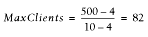
then with no sharing in place:
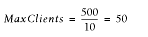
With sharing in place, if your numbers are similar to the ones in our
example, you can have 64% more servers without buying more RAM (82
compared to 50).
If you improve sharing and the sharing level is maintained throughout
the child's life, you might get:
Total_RAM = 500Mb
Max_Process_Size = 10Mb
Shared_RAM_per_Child = 8Mb
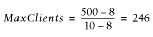
Here we have 392% more servers (246 compared to 50)!
There is one more nuance to remember. The number of requests per
second that your server can serve won't grow
linearly when you raise the value of MaxClients.
Assuming that you have a lot of RAM available and you try to set
MaxClients as high as possible, you will find that
you eventually reach a point where increasing the
MaxClients value will not improve performance.
The more clients that are running, the more CPU time will be required
and the fewer CPU time slices each process will receive. The response
latency (the time to respond to a request) will grow, so you
won't see the expected improvement.
Let's explore these issues.

The test handler that we have used is shown in Example 11-1. You can see that it does mostly CPU-intensive
computations.
Example 11-1. Book/HandlerBenchmark.pm
package Book::HandlerBenchmark;
use Apache::Constants qw(:common);
sub handler {
$r = shift;
$r->send_http_header('text/html');
$r->print("Hello");
my $x = 100;
my $y = log ($x ** 100) for (0..100);
return OK;
}
1;
Here's the configuration section to enable this
handler:
PerlModule Book::HandlerBenchmark
<Location /benchmark_handler_middle>
SetHandler perl-script
PerlHandler Book::HandlerBenchmark
</Location>
Now we will run the benchmark for different values of
MaxClients. The results are:
MaxClients | avtime completed failed rps
--------------------------------------------
100 | 333 50000 0 755
125 | 340 50000 0 780
150 | 342 50000 0 791
175 | 338 50000 0 783
200 | 339 50000 0 785
225 | 365 50000 0 760
250 | 402 50000 0 741
---------------------------------------------
Non-varying sub-test parameters:
---------------------------------------------
MaxRequestsPerChild : 0
StartServers : 100
Concurrency : 300
Number of requests : 50000
---------------------------------------------
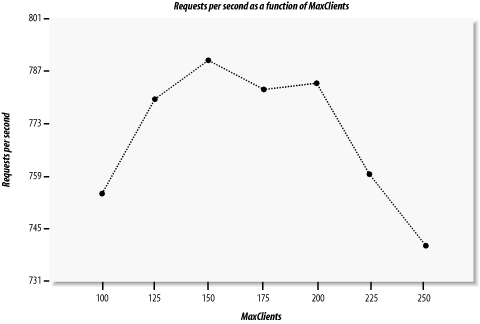
Figure 11-1 depicts requests per second versus
MaxClients. Looking at this figure, you can see
that with a concurrency level of 300, the performance is almost
identical for MaxClients values of 150 and 200,
but it goes down for the value of 100 (not enough processes) and are
even worse for the value of 250 (too many processes competing over
CPU cycles). Note that we have kept the server fully loaded, since
the number of concurrent requests was always higher than the number
of available processes, which means that some requests were queued
rather than responded to immediately. When the number of processes
went above 200, more and more time was spent by the processes in the
sleep state and context switching, enlarging the latency of response
generation. On the other hand, with only 100 available processes, the
CPU was not fully loaded and we had plenty of memory available. You
can see that in our case, a MaxClients value of
150 is close to optimal.[41]
[41]When we tried the same
benchmark on different machines with a much stronger CPU and more
memory, we saw different results. So we would like to stress again
that the optimal configuration choices for a given application and
load pattern may vary from machine to machine.
Figure 11-1. Requests per second as a function of MaxClients
This leads us to an interesting discovery, which we can summarize in
the following way: increasing your RAM might not improve the
performance if
your CPU is already fully loaded with the
current number of processes. In fact, if you start more processes,
you will get a degradation in performance. On the other hand, if you
decide to upgrade your machine with a very powerful CPU but you
don't add enough memory, the machine will use swap
memory or the CPU will be under-used; in any case, the performance
will be poor. Whenever you opt for a more powerful CPU, you must
always budget for enough extra memory to ensure that the
CPU's greater processing power is fully utilized. It
is generally best to add more memory in the first place to see if
that helps with performance problems (assuming you follow our tuning
advice as well).
To discover the right configuration for your server, you should run
benchmarks on a machine with identical hardware to the one that you
are going to use in production. Try to simulate the probable loads
your machine will experience. Remember that the load will be
variable, and plan accordingly. Experiment with the configuration
parameters under different loads to discover the optimal balance of
CPU and RAM use for your machine. When you change the processor or
add RAM, retest the configuration to see how to change the settings
to get the best from the new hardware.
You can tune your machine using reports like the one in our example,
by analyzing either the requests per second
(rps) column, which shows the throughput of your
server, or the average processing time (avtime)
column, which can be seen as the latency of your server. Take more
samples to build nicer linear graphs, and pick the value of
MaxClients where the curve reaches a maximum value
for a throughput graph or reaches the minimum value for a latency graph.