Example 11-3. stat_call_sample.pl
use Time::HiRes qw(gettimeofday tv_interval);
my $calls = 1_000_000;

my $start_time = [ gettimeofday ];

stat "/foo" for 1..$calls;

my $end_time = [ gettimeofday ];
my $avg = tv_interval($start_time,$end_time) / $calls;
print "The average execution time: $avg seconds\n";
Before we actually run the script we should distinguish between two
different scenarios. When the server is idle, the time between the
first and the last system call will be much shorter than the same
time measured on a loaded system. This is because on an idle system,
a process can use the CPU very often, whereas on a loaded system,
lots of processes compete for CPU time and each process has to wait
longer to get the same amount of CPU time.
So first we run the above code on an unloaded system:
panic% perl stat_call_sample.pl
The average execution time: 4.209645e-06 seconds
Here it takes about four microseconds to execute a stat(
) call. Now we'll start a CPU-intensive
process in one console (make sure to kill the process afterward!).
The following code keeps the CPU busy all the time:
panic% perl -e '1 while 1'
And now we run the stat_call_sample.pl script in
another console:
panic% perl stat_call_sample.pl
The average execution time: 8.777301e-06 seconds
You can see that the average time has doubled (about eight
microseconds). This is intuitive, since there were two processes
competing for CPU resources. Now if we run four occurrences of the
above code:
panic% perl -e '1**1 while 1' &
panic% perl -e '1**1 while 1' &
panic% perl -e '1**1 while 1' &
panic% perl -e '1**1 while 1' &
and run our script in parallel with these processes, we get:
panic% perl stat_call_sample.pl
2.0853558e-05 seconds
So the average stat( )system call is five times
longer now (about 20 microseconds). Now if you have 50 mod_perl
processes that keep the CPU busy all the time, the stat(
) call will be 50 times slower and it'll
take 0.2 milliseconds to complete a series of calls. If you have five
redundant calls, as in the strace example above,
they add up to one millisecond. If you have more processes constantly
consuming CPU resources, this time adds up. Now multiply this time by
the number of processes that you have and you get a few seconds lost.
For some services this loss is insignificant, while for others it
could be very significant.
PerlModule Apache::Constants
<VirtualHost 10.10.10.10:80>
    ...
    PerlTransHandler Apache::Constants::OK
    ...
</VirtualHost>
The Apache::Constants::OK constant (which is
actually a subroutine) is used here as a handler that does nothing
but finish the translation phase by returning OK.
By skipping the default translation handler, which tries to find a
filesystem component that matches the given URI, you save the
redundant stat( ) calls!
As you see, it affects only this specific virtual host. Remember that
PerlTransHandler cannot appear inside a specific
<Location> or similar section, because the
request has not yet been associated with a particular file or
directory.
As we will show next, Apache's default
TransHandler may perform several stat(
) calls when the request is served by a virtual resource
that doesn't reside on the filesystem. Things get
worse when Apache is configured to look for
.htaccess files, adding many redundant
open( ) calls.
Let's start with the following simple configuration
and try to reduce the number of redundant system calls to a minimum:
DocumentRoot "/home/httpd/docs"
<Directory />
    AllowOverride All
</Directory>
<Location /foo/test>
    SetHandler perl-script
    PerlHandler Apache::Foo
</Location>
The above configuration causes the Perl handler( )
defined in Apache::Foo to be executed when we make
a request to /foo/test. Notice that in the test
setup there is no real file to be executed and no
.htaccess file.
Using the above configuration, the system calls trace may look as
follows:
stat("/home/httpd/docs/foo/test", 0xbffff8fc) = -1 ENOENT
  (No such file or directory)
stat("/home/httpd/docs/foo",      0xbffff8fc) = -1 ENOENT
  (No such file or directory)
stat("/home/httpd/docs",
  {st_mode=S_IFDIR|0755, st_size=1024, ...}) = 0
open("/.htaccess", O_RDONLY)                 = -1 ENOENT
  (No such file or directory)
open("/home/.htaccess", O_RDONLY)            = -1 ENOENT
  (No such file or directory)
open("/home/httpd/.htaccess", O_RDONLY)      = -1 ENOENT
  (No such file or directory)
open("/home/httpd/docs/.htaccess", O_RDONLY) = -1 ENOENT
  (No such file or directory)
stat("/home/httpd/docs/test", 0xbffff774)    = -1 ENOENT
  (No such file or directory)
stat("/home/httpd/docs",
  {st_mode=S_IFDIR|0755, st_size=1024, ...}) = 0
Now we modify the <Directory> entry and add
AllowOverride None, which, among other things,
tells Apache not to search for .htaccess files:
<Directory />
    AllowOverride None
</Directory>
After restarting the server and issuing a request to
/foo/test, we see that the four open(
) calls for .htaccess have gone. The
remaining system calls are:
stat("/home/httpd/docs/foo/test", 0xbffff8fc) = -1 ENOENT
  (No such file or directory)
stat("/home/httpd/docs/foo",      0xbffff8fc) = -1 ENOENT
  (No such file or directory)
stat("/home/httpd/docs",
  {st_mode=S_IFDIR|0755, st_size=1024, ...}) = 0
stat("/home/httpd/docs/test", 0xbffff774)    = -1 ENOENT
  (No such file or directory)
stat("/home/httpd/docs",
  {st_mode=S_IFDIR|0755, st_size=1024, ...}) = 0
Next, let's try to shortcut the
foo location with:
Alias /foo/ /
which makes Apache look for the file in the /
directory and not under /home/httpd/docs/foo.
Let's restart the server and try again:
stat("/test", 0xbffff8fc) = -1 ENOENT (No such file or directory)
Now we've got only one stat( )
call left!
Let's replace the Aliassetting
we have just added with:
PerlModule Apache::Constants
PerlTransHandler Apache::Constants::OK
as explained earlier. When we issue the request, we see no remaining
stat( ) calls. This technique works if you serve
content using only mod_perl handlers, since CGI scripts and other
files won't be looked for on the filesystem now.
Also, since the default translation handler is now skipped,
$r->filename now won't be set.
Example 11-4. perl_section.conf
<Perl>
  package Book::Trans;
  use Apache::Constants qw(:common);
  sub handler {
      my $r = shift;
      return OK if $r->uri( ) =~ m|^/foo|;
      return DECLINED;
  }

  package Apache::ReadConfig;
  $PerlTransHandler = "Book::Trans";
</Perl>
Here we have defined the Book::Trans package and
implemented the handler( ) function. Then we have
assigned this handler to the PerlTransHandler.
You can move the code in the module into an external file (e.g.,
Book/Trans.pm) and configure the
PerlTransHandler with:
PerlTransHandler Book::Trans
in the normal way (no <Perl>section
required).
Now we'll run some benchmarks to test the solutions
described above, both individually and in groups. To make the
difference in the number of stat( ) calls more
prominent, we will use a very light handler that just prints
something out.
Example 11-5. Book/News.pm
package Book::News;
use Apache::Constants qw(:common);
sub handler {
    my $r = shift;
    my $uri = $r->uri;
    my @sections = split "/", $uri;
    # in a real handler you'd do some DB lookup and return the story:
    # my $story = get_story(@sections);
    $r->send_http_header('text/plain');
    print "Story matching @sections\n";
    return OK;
}
1;
This is the URI we have used for testing:
/news/perl/mod_perl/summary
Notice that the URI is long enough to generate many stat(
) calls with the default Apache configuration.
This is the main configuration:
<Location /news>
    SetHandler perl-script
    PerlHandler +Book::News
</Location>
Now we try different configurations and see how they influence
performance. Each configuration is listed with a tag in parentheses
that is used as a key in the table and explanation that follows.
-
(default) Nothing was added:
<Directory />
    AllowOverride All
</Directory>
-
(noht) Prevent .htaccess
lookup:
<Directory />
    AllowOverride None
</Directory>
-
(alias) Location alias shortcutting:
Alias /news /
-
(trans) Using a nondefault
TransHandler:
<Perl>
    package Book::Trans;
    use Apache::Constants qw(:common);
    sub handler {
        my $r = shift;
        return OK if $r->uri( ) =~ m|^/news|;
        return DECLINED;
    }

    package Apache::ReadConfig;
    $PerlTransHandler = "Book::Trans";
</Perl>
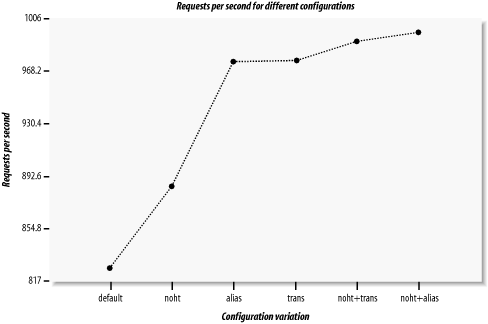
The results, sorted by the requests per second
(rps) rate, are:
Options    | avtime completed failed    rps
-----------|-------------------------------
noht+alias |     27      5000      0    996
noht+trans |     29      5000      0    988
trans      |     29      5000      0    975
alias      |     28      5000      0    974
noht       |     32      5000      0    885
default    |     34      5000      0    827
with static arguments:
Concurrency         : 30
Number of requests  : 5000
The concurrency and connections don't matter here;
we are concerned with the relative rather than the absolute numbers.
Figure 11-2. Results of the four solutions
Preventing .htaccess lookup
(noht) improved the performance by about 8% (885
versus 827). Using alias shortcutting (alias) or
a nondefault TransHandler
(trans) gave even more of a performance boost:
since for a long URI like the one in our example, each directory
generates a few stat( ) and open(
)system calls, the speedup was around 15% compared to the
standard configuration (default). Grouping the
prevention of .htaccess lookup
(noht) plus one of the techniques that
don't look for the nonexistent file in the
filesystem (alias or trans)
gave a performance boost of about 18% (996 versus 827).
As we have seen, the number of pseudo-subdirectories is in direct
proportion to the number of stat( ) and
open( )system calls that are made. To prove this,
let's use the standard configuration
(default) and benchmark three URIs with a
different number of sections (directories), without counting the
first section (/news):
Sections  URI
---------------------------------------------
1         /news/perl
3         /news/perl/mod_perl/summary
5         /news/perl/mod_perl/summary/foo/bar
The results are what we expected:
Sections  | avtime completed failed    rps
---------------------------------------------------
       1  |     33      5000      0    849
       3  |     34      5000      0    829
       5  |     35      5000      0    801
---------------------------------------------------
Each of the two sections add an extra millisecond to the average
processing and connection time, which reduces performance by about 25
requests per second.
It's important to read the figures cautiously.
Improving performance by 20% simply by adding a few configuration
directives is not likely to be achieved in practice. In our test code
we used a very light handler, which did nothing but send a few lines
of text without doing any processing. When you use real code, whose
runtime is not 30-40 milliseconds but 300-400 milliseconds, the
improvement of 7 milliseconds on average (as we saw between the
standard configuration (default), giving 34 ms,
and the combination of noht and
alias, giving 27 ms) might be insignificant. The
tuning we've discussed here is important mostly for
servers that serve millions of requests per day and where every
millisecond counts.