In this chapter we will talk about two issues that play an important
role in optimizing server performance: sharing memory and forking.
Firstly, mod_perl Apache processes can become quite large, and it is
therefore very important to make sure that the memory used by the
Apache processes is shared between them as much as possible.
Secondly, if you need the Apache processes to fork new processes, it
is important to perform the fork( ) calls in the
proper way.
10.1. Sharing Memory
The sharing of memory is a very important factor. If your OS supports it
(and most sane systems do), a lot of memory can be saved by sharing
it between child processes. This is possible only when code is
preloaded at server startup. However, during a child
process's life, its memory pages tend to become
unshared. Here is why.
There is no way to make Perl allocate memory so that (dynamic)
variables land on different memory pages from constants or the rest
of your code (which is really just data to the Perl interpreter), so
the copy-on-write effect (explained in a moment)
will hit almost at random.
If many modules are
preloaded, you can trade off the
memory that stays shared against the time for an occasional fork of a
new Apache child by tuning the MaxRequestsPerChild
Apache directive. Each time a child reaches
this upper limit and dies, it will release its unshared pages. The
new child will have to be forked, but it will share its fresh pages
until it writes on them (when some variable gets modified).
The ideal is a point where processes usually restart before too much
memory becomes unshared. You should take some measurements, to see if
it makes a real difference and to find the range of reasonable
values. If you have success with this tuning, bear in mind that the
value of MaxRequestsPerChild will probably be
specific to your situation and may change with changing
circumstances.
It is very important to understand that the goal is not necessarily
to have the highest MaxRequestsPerChild that you
can. Having a child serve 300 requests on precompiled code is already
a huge overall speedup. If this value also provides a substantial
memory saving, that benefit may outweigh using a higher
MaxRequestsPerChild value.
A newly forked child inherits the Perl interpreter from
its parent. If most of the Perl code is preloaded at server startup,
then most of this preloaded code is inherited from the parent process
too. Because of this, less RAM has to be written to create the
process, so it is ready to serve requests very quickly.
During the life of the child, its memory pages (which
aren't really its own to start with—it uses
the parent's pages) gradually get
dirty—variables that were originally
inherited and shared are updated or modified—and
copy-on-write happens. This reduces the number
of shared memory pages, thus increasing the memory requirement.
Killing the child and spawning a new one allows the new child to use
the pristine shared memory of the parent process.
The recommendation is that
MaxRequestsPerChildshould not be too large, or
you will lose some of the benefit of sharing memory. With memory
sharing in place, you can run many more servers than without it. In
Chapter 11 we will devise a formula to calculate
the optimum value for the MaxClients directive
when sharing is taking place.
As we mentioned in Chapter 9, you can find the
size of the shared memory by using the ps(1) or
top(1) utilities, or by using the
GTop module:
use GTop ( );
print "Shared memory of the current process: ",
GTop->new->proc_mem($$)->share, "\n";
print "Total shared memory: ",
GTop->new->mem->share, "\n";
10.1.1. Calculating Real Memory Usage
We have shown how to measure the size of the
process's shared memory, but we still want to know
what the real memory usage is. Obviously this cannot be calculated
simply by adding up the memory size of each process, because that
wouldn't account for the shared memory.
On the other hand, we cannot just subtract the shared memory size
from the total size to get the real memory-usage numbers, because in
reality each process has a different history of processed requests,
which makes different memory pages dirty; therefore, different
processes have different memory pages shared with the parent process.
So how do we measure the real memory size used by all running
web-server processes? It is a difficult task—probably too
difficult to make it worthwhile to find the exact number—but we
have found a way to get a fair approximation.
This is the calculation technique that we have devised:
Calculate all the unshared memory, by summing up the difference
between shared and system memory of each process. To calculate a
difference for a single process, use:
use GTop;
my $proc_mem = GTop->new->proc_mem($$);
my $diff = $proc_mem->size - $proc_mem->share;
print "Difference is $diff bytes\n";
Add the system memory use of the parent process, which already
includes the shared memory of all other processes.
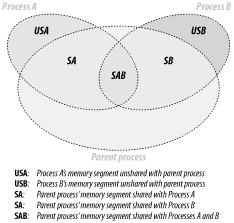
Figure 10-1. Child processes sharing memory with the parent process
The Apache::VMonitor module uses
this
technique to display real memory usage. In fact, it makes no
separation between the parent and child processes. They are all
counted indifferently using the following code:
use GTop ( );
my $gtop = GTop->new;
my ($parent_pid, @child_pids) = some_code( );
# add the parent proc memory size
my $total_real = $gtop->proc_mem($parent_pid)->size;
# add the unshared memory sizes
for my $pid (@child_pids) {
my $proc_mem = $gtop->proc_mem($pid);
$total_real += $proc_mem->size - $proc_mem->share;
}
Now $total_real contains approximately the amount
of memory really used.
This method has been verified in the following way. We calculate the
real memory used using the technique described above. We then look at
the system memory report for the total memory usage. We then stop
Apache and look at the total memory usage for a second time. We check
that the system memory usage report indicates that the total memory
used by the whole system has gone down by about the same number that
we've calculated.
Note that some OSes do smart memory-page caching, so
you may not see the memory usage decrease immediately when you stop
the server, even though it is actually happening. Also, if your
system is swapping, it's possible that your swap
memory was used by the server as well as the real memory. Therefore,
to get the verification right you should use a tool that reports real
memory usage, cached memory, and swap memory. For example, on Linux
you can use the free command. Run this command
before and after stopping the server, then compare the numbers
reported in the column called free.
Based on this logic we can devise a formula for calculating the
maximum possible number of child processes, taking into account the
shared memory. From now on, instead of adding the memory size of the
parent process, we are going to add the maximum shared size of the
child processes, and the result will be approximately the same. We do
that approximation because the size of the parent process is usually
unknown during the calculation.
Therefore, the formula to calculate the maximum number of child
processes with minimum shared memory size of
Min_Shared_RAM_per_Child MB that can run
simultaneously on a machine that has a total RAM of
Total_RAM MB available for the web server, and
knowing the maximum process size, is:
which can also be rewritten as:
since the denominator is really the maximum possible amount of a
child process's unshared memory.
In Chapter 14 we will see how we can enforce the
values used in calculation during runtime.
10.1.2. Memory-Sharing Validation
How do you find out if the code you write is shared between
processes or not? The code should remain shared, except when it is on
a memory page used by variables that change. As you know, a variable
becomes unshared when a process modifies its value, and so does the
memory page it resides on, because the memory is shared in
memory-page units.
Sometimes you have variables
that
use a lot of memory, and you consider their usage read-only and
expect them to be shared between processes. However, certain
operations that seemingly don't modify the variable
values do modify things internally, causing the memory to become
unshared.
Imagine that you have a 10 MB in-memory database that resides in a
single variable, and you perform various operations on it and want to
make sure that the variable is still shared. For example, if you do
some regular expression (regex)-matching processing on this variable
and you want to use the pos( ) function, will it
make the variable unshared or not? If you access the variable once as
a numerical value and once as a string value, will the variable
become unshared?
The Apache::Peek module comes to the rescue.
10.1.2.1. Variable unsharing caused by regular expressions
Let's write a module
called
Book::MyShared, shown in Example 10-1, which we will preload at server startup so
that all the variables of this module are initially shared by all
children.
Example 10-1. Book/MyShared.pm
package Book::MyShared;
use Apache::Peek;
my $readonly = "Chris";
sub match { $readonly =~ /\w/g; }
sub print_pos { print "pos: ",pos($readonly),"\n";}
sub dump { Dump($readonly); }
1;
This module declares the package Book::MyShared,
loads the Apache::Peek module and defines the
lexically scoped $readonly variable. In most
instances, the $readonly variable will be very
large (perhaps a huge hash data structure), but here we will use a
small variable to simplify this example.
The module also defines three subroutines: match(
), which does simple character matching;
print_pos( ), which prints the current position of
the matching engine inside the string that was last matched; and
finally dump( ), which calls the
Apache::Peek module's
Dump( ) function to dump
a raw Perl representation of the
$readonly variable.
Now we write a script (Example 10-2) that prints the
process ID (PID) and calls all three functions. The goal is to check
whether pos( ) makes the variable dirty and
therefore unshared.
Before you restart the server, in httpd.conf,
set:
MaxClients 2
for easier tracking. You need at least two servers to compare the
printouts of the test program. Having more than two can make the
comparison process harder.
Now open two browser windows and issue requests for this script in
each window, so that you get different PIDs reported in the two
windows and so that each process has processed a different number of
requests for the share_test.pl script.
In the first window you will see something like this:
All the addresses of the supposedly large data structure are the same
(0x8250e8c and
0x8271af0)—therefore, the variable data
structure is almost completely shared. The only difference is in the
SV.MAGIC.MG_LEN record, which is not shared. This
record is used to track where the last m//g match
left off for the given variable, (e.g., by pos( ))
and therefore it cannot be shared. See the
perlre manpage for more information.
Given that the $readonly variable is a big one,
its value is still shared between the processes, while part of the
variable data structure is nonshared. The nonshared part is almost
insignificant because it takes up very little memory space.
If you need to compare more than one variable, doing it by hand can
be quite time consuming and error prone. Therefore,
it's better to change the test script to dump the
Perl datatypes into files (e.g., /tmp/dump.$$,
where $$ is the PID of the process). Then you
can use the diff(1) utility to see whether there
is some difference.
Changing the dump( ) function to write the
information to a file will do the job. Notice that we use
Devel::Peek and not
Apache::Peek, so we can easily reroute the
STDERRstream into a file. In our example, when
Devel::Peek tries to print to
STDERR, it actually prints to our file. When we
are done, we make sure to restore the original
STDERR file handle.
package Book::MyShared2;
use Devel::Peek;
my $readonly = "Chris";
sub match { $readonly =~ /\w/g; }
sub print_pos { print "pos: ",pos($readonly),"\n";}
sub dump {
my $dump_file = "/tmp/dump.$$";
print "Dumping the data into $dump_file\n";
open OLDERR, ">&STDERR";
open STDERR, ">$dump_file" or die "Can't open $dump_file: $!";
Dump($readonly);
close STDERR ;
open STDERR, ">&OLDERR";
}
1;
Now we modify our script to use the modified module, as shown in
Example 10-4.
Now we can run the script as before (with MaxClients
2). Two dump files will be created in the directory
/tmp. In our test these were created as
/tmp/dump.1224 and
/tmp/dump.1225. When we run
diff(1):
we see that the two padlists (of the variable
$readonly) are different, as we observed before,
when we did a manual comparison.
If we think about these results again, we come to the conclusion that
there is no need for two processes to find out whether the variable
gets modified (and therefore unshared). It's enough
just to check the data structure twice, before the script was
executed and again afterward. We can modify the
Book::MyShared2 module to dump the padlists into a
different file after each invocation and then to run
diff(1) on the two files.
Suppose you have some lexically
scoped variables (i.e., variables declared with my(
)) in an Apache::Registryscript. If you
want to watch whether they get changed between invocations inside one
particular process, you can use the
Apache::RegistryLexInfo module. It does exactly
that: it takes a snapshot of the padlist before and after the code
execution and shows the difference between the two. This particular
module was written to work with Apache::Registry
scripts, so it won't work for loaded modules. Use
the technique we described above for any type of variables in modules
and scripts.
Another way of ensuring that a
scalar is read-only and therefore shareable is to use either the
constant pragma or the readonly
pragma, as shown in Example 10-5. But then you
won't be able to make calls that alter the variable
even a little, such as in the example that we just showed, because it
will be a true constant variable and you will get a compile-time
error if you try this.
Example 10-5. Book/Constant.pm
package Book::Constant;
use constant readonly => "Chris";
sub match { readonly =~ /\w/g; }
sub print_pos { print "pos: ",pos(readonly),"\n";}
1;
panic% perl -c Book/Constant.pm
Can't modify constant item in match position at Book/Constant.pm
line 5, near "readonly)"
Book/Constant.pm had compilation errors.
package Book::Constant1;
use constant readonly => "Chris";
sub match { readonly =~ /\w/g; }
1;
It doesn't modify the variable flags at all.
10.1.2.2. Numerical versus string access to variables
Data can get unshared on
read as well—for example,
when a numerical variable is accessed as a string. Example 10-7 shows some code that proves this.
Example 10-7. numerical_vs_string.pl
#!/usr/bin/perl -w
use Devel::Peek;
my $numerical = 10;
my $string = "10";
$|=1;
dump_numerical( );
read_numerical_as_numerical( );
dump_numerical( );
read_numerical_as_string( );
dump_numerical( );
dump_string( );
read_string_as_numerical( );
dump_string( );
read_string_as_string( );
dump_string( );
sub read_numerical_as_numerical {
print "\nReading numerical as numerical: ", int($numerical), "\n";
}
sub read_numerical_as_string {
print "\nReading numerical as string: ", "$numerical", "\n";
}
sub read_string_as_numerical {
print "\nReading string as numerical: ", int($string), "\n";
}
sub read_string_as_string {
print "\nReading string as string: ", "$string", "\n";
}
sub dump_numerical {
print "\nDumping a numerical variable\n";
Dump($numerical);
}
sub dump_string {
print "\nDumping a string variable\n";
Dump($string);
}
The test script defines two lexical variables: a number and a string.
Perl doesn't have strong data types like C does;
Perl's scalar variables can be accessed as strings
and numbers, and Perl will try to return the equivalent numerical
value of the string if it is accessed as a number, and vice versa.
The initial internal representation is based on the initially
assigned value: a numerical value[37] in the case of
$numerical and a string value[38] in the
case of $string.
[37]IV, for signed integer value, or a few other
possible types for floating-point and unsigned integer
representations.
[38]PV, for pointer value (SV
is already taken by a scalar data type)
The script accesses $numerical as a number and
then as a string. The internal representation is printed before and
after each access. The same test is performed with a variable that
was initially defined as a string ($string).
When we run the script, we get the following output:
Dumping a numerical variable
SV = IV(0x80e74c0) at 0x80e482c
REFCNT = 4
FLAGS = (PADBUSY,PADMY,IOK,pIOK)
IV = 10
Reading numerical as numerical: 10
Dumping a numerical variable
SV = PVNV(0x810f960) at 0x80e482c
REFCNT = 4
FLAGS = (PADBUSY,PADMY,IOK,NOK,pIOK,pNOK)
IV = 10
NV = 10
PV = 0
Reading numerical as string: 10
Dumping a numerical variable
SV = PVNV(0x810f960) at 0x80e482c
REFCNT = 4
FLAGS = (PADBUSY,PADMY,IOK,NOK,POK,pIOK,pNOK,pPOK)
IV = 10
NV = 10
PV = 0x80e78b0 "10"\0
CUR = 2
LEN = 28
Dumping a string variable
SV = PV(0x80cb87c) at 0x80e8190
REFCNT = 4
FLAGS = (PADBUSY,PADMY,POK,pPOK)
PV = 0x810f518 "10"\0
CUR = 2
LEN = 3
Reading string as numerical: 10
Dumping a string variable
SV = PVNV(0x80e78d0) at 0x80e8190
REFCNT = 4
FLAGS = (PADBUSY,PADMY,NOK,POK,pNOK,pPOK)
IV = 0
NV = 10
PV = 0x810f518 "10"\0
CUR = 2
LEN = 3
Reading string as string: 10
Dumping a string variable
SV = PVNV(0x80e78d0) at 0x80e8190
REFCNT = 4
FLAGS = (PADBUSY,PADMY,NOK,POK,pNOK,pPOK)
IV = 0
NV = 10
PV = 0x810f518 "10"\0
CUR = 2
LEN = 3
We know that Perl does the conversion from one type to another on the
fly, and that's where the variables get
modified—during the automatic conversion behind the scenes.
From this simple test you can see that variables may change
internally when accessed in different contexts. Notice that even when
a numerical variable is accessed as a number for the first time, its
internals change, as Perl has intialized its PV
and NV fields (the string and floating-point
represenations) and adjusted the FLAGS fields.
From this example you can clearly see that if you want your variables
to stay shared and there is a chance that the same variable will be
accessed both as a string and as a numerical value, you have to
access this variable as a numerical and as a string, as in the above
example, before the fork happens (e.g., in the startup file). This
ensures that the variable will be shared if no one modifies its
value. Of course, if some other variable in the same page happens to
change its value, the page will become unshared anyway.
10.1.3. Preloading Perl Modules at Server Startup
As we just explained, to get the code-sharing effect, you
should preload the code before the child processes get spawned. The
right place to preload modules is at server startup.
You can use the PerlRequireand PerlModule
directives to load commonly used modules such as
CGI.pm and DBI when the server
is started. On most systems, server children will be able to share
the code space used by these modules. Just add the following
directives into httpd.conf:
PerlModule CGI
PerlModule DBI
An even better approach is as follows. First, create a separate
startup file. In this file you code in plain Perl, loading modules
like this:
use DBI ( );
use Carp ( );
1;
(When a module is loaded, it may export symbols to your package
namespace by default. The empty parentheses ( )
after a module's name prevent this.
Don't forget this, unless you need some of these in
the startup file, which is unlikely. It will save you a few more
kilobytes of memory.)
Next, require( ) this startup
file
in httpd.conf with the
PerlRequire directive, placing the directive
before all the other mod_perl configuration directives:
PerlRequire /path/to/startup.pl
As usual, we provide some numbers to prove the theory.
Let's conduct a memory-usage test to prove that
preloading reduces memory requirements.
To simplify the measurement, we will use only one child process. We
will use these settings in httpd.conf:
We are going to use memuse.pl (shown in Example 10-8), an Apache::Registry
script that consists of two parts: the first one loads a bunch of
modules (most of which aren't going to be used); the
second reports the memory size and the shared memory size used by the
single child process that we start, and the difference between the
two, which is the amount of unshared memory.
Example 10-8. memuse.pl
use strict;
use CGI ( );
use DB_File ( );
use LWP::UserAgent ( );
use Storable ( );
use DBI ( );
use GTop ( );
my $r = shift;
$r->send_http_header('text/plain');
my $proc_mem = GTop->new->proc_mem($$);
my $size = $proc_mem->size;
my $share = $proc_mem->share;
my $diff = $size - $share;
printf "%10s %10s %10s\n", qw(Size Shared Unshared);
printf "%10d %10d %10d (bytes)\n", $size, $share, $diff;
First we restart the server and execute this CGI script with none of
the above modules preloaded. Here is the result:
use strict;
use CGI ( );
use DB_File ( );
use LWP::UserAgent ( );
use Storable ( );
use DBI ( );
use GTop ( );
1;
and copy it into the startup.pl file. The script
remains unchanged. We restart the server (now the modules are
preloaded) and execute it again. We get the following results:
You can clearly see that when the modules weren't
preloaded, the amount of shared memory was about 1,864 KB smaller
than in the case where the modules were preloaded.
Assuming that you have 256 MB dedicated to the web server, if you
didn't preload the modules, you could have 103
servers:
268435456 = X * 2572288 + 2134016
X = (268435456 - 2134016) / 2572288 = 103
(Here we have used the formula that we devised earlier in this
chapter.)
Now let's calculate the same thing with the modules
preloaded:
268435456 = X * 712704 + 3997696
X = (268435456 - 3997696) / 712704 = 371
You can have almost four times as many servers!!!
Remember, however, that memory pages get dirty, and the amount of
shared memory gets smaller with time. We have presented the ideal
case, where the shared memory stays intact. Therefore, in use, the
real numbers will be a little bit different.
Since you will use different modules and different code, obviously in
your case it's possible that the process sizes will
be bigger and the shared memory smaller, and vice versa. You probably
won't get the same ratio we did, but the example
certainly shows the possibilities.
10.1.4. Preloading Registry Scripts at Server Startup
Suppose you find yourself stuck with self-contained
Perl CGI scripts (i.e., all the code placed in the CGI script
itself). You would like to preload modules to benefit from sharing
the code between the children, but you can't or
don't want to move most of the stuff into modules.
What can you do?
Luckily, you can preload scripts as well. This time the
Apache::RegistryLoader module comes to your aid.
Apache::RegistryLoader compiles
Apache::Registryscripts at
server startup.
For example, to preload the script
/perl/test.pl, which is in fact the file
/home/httpd/perl/test.pl, you would do the
following:
use Apache::RegistryLoader ( );
Apache::RegistryLoader->new->handler("/perl/test.pl",
"/home/httpd/perl/test.pl");
You should put this code either in <Perl>
sections or in a startup script.
But what if you have a bunch of scripts located under the same
directory and you don't want to list them one by
one? Then the File::Find module will do most of
the work for you.
The script shown in Example 10-9 walks the directory
tree under which all Apache::Registryscripts are
located. For each file with the extension .pl,
it calls the Apache::RegistryLoader::handler( )
method to preload the script in the parent server. This happens
before Apache pre-forks the child processes.
Example 10-9. startup_preload.pl
use File::Find qw(finddepth);
use Apache::RegistryLoader ( );
{
my $scripts_root_dir = "/home/httpd/perl/";
my $rl = Apache::RegistryLoader->new;
finddepth(
sub {
return unless /\.pl$/;
my $url = $File::Find::name;
$url =~ s|$scripts_root_dir/?|/|;
warn "pre-loading $url\n";
# preload $url
my $status = $rl->handler($url);
unless($status = = 200) {
warn "pre-load of '$url' failed, status=$status\n";
}
},
$scripts_root_dir
);
}
Note that we didn't use the second argument to
handler( ) here, as we did in the first example.
To make the loader smarter about the URI-to-filename translation, you
might need to provide a trans( ) function to
translate the URI to a filename. URI-to-filename translation normally
doesn't happen until an HTTP request is received, so
the module is forced to do its own translation. If the filename is
omitted and a trans( ) function is not defined,
the loader will try to use the URI relative to the ServerRoot.
A simple trans( ) function can be something like
this:
sub mytrans {
my $uri = shift;
$uri =~ s|^/perl/|/home/httpd/perl/|;
return $uri;
}
You can easily derive the right translation by looking at the
Alias directive. The above mytrans(
) function matches our Alias:
Alias /perl/ /home/httpd/perl/
After defining the URI-to-filename translation function, you should
pass it during the creation of the
Apache::RegistryLoader object:
my $rl = Apache::RegistryLoader->new(trans => \&mytrans);
We won't show any benchmarks here, since the effect
is just like preloading modules. However, we will use this technique
later in this chapter, when we will need to have a fair comparison
between PerlHandler code and
Apache::Registryscripts. This will require both
the code and the scripts to be preloaded at server startup.
10.1.5. Module Initialization at Server Startup
It's important to preload modules and scripts at server
startup. But for some modules this isn't enough, and
you have to prerun their initialization code to get more memory pages
shared. Usually you will find information about specific modules in
their respective manpages. We will present a few examples of widely
used modules where the code needs to be initialized.
10.1.5.1. Initializing DBI.pm
The first example is the DBI module.
DBIworks
with many database drivers from the DBD:: category
(e.g., DBD::mysql). If you want to minimize memory
use after Apache forks its children, it's not enough
to preload DBI—you must initialize
DBI with the driver(s) that you are going to use
(usually a single driver is used). Note that you should do this only
under mod_perl and other environments where sharing memory is very
important. Otherwise, you shouldn't initialize
drivers.
You probably already know that under mod_perl you should use the
Apache::DBI module to get persistent database
connections (unless you open a separate connection for each user).
Apache::DBI automatically
loads DBI and
overrides some of its methods. You should continue coding as if you
had loaded only the DBI module.
As with preloading modules, our goal is to find the configuration
that will give the smallest difference between the shared and normal
memory reported, and hence the smallest total memory usage.
To simplify the measurements, we will again use only one child
process. We will use these settings in
httpd.conf:
use Gtop( );
use Apache::DBI( ); # preloads DBI as well
We are going to run memory benchmarks on five different versions of
the startup.pl file:
Version 1
Leave the file unmodified.
Version 2
Install the MySQL driver (we will use the MySQL RDBMS for our test):
DBI->install_driver("mysql");
It's safe to use this method—as with
use( ), if it can't be installed,
it will die( ).
Version 3
Preload the MySQL driver module:
use DBD::mysql;
Version 4
Tell Apache::DBI to connect to the database when
the child process starts (ChildInitHandler). No
driver is preloaded before the child is spawned!
Apache::DBI->connect_on_init('DBI:mysql:test::localhost', "", "",
{
PrintError => 1, # warn( ) on errors
RaiseError => 0, # don't die on error
AutoCommit => 1, # commit executes
# immediately
}
) or die "Cannot connect to database: $DBI::errstr";
Version 5
Use both connect_on_init( ) from version 4 and
install_driver( ) from version 2.
The Apache::Registry test script that we have used
is shown in Example 10-10.
Example 10-10. preload_dbi.pl
use strict;
use GTop ( );
use DBI ( );
my $dbh = DBI->connect("DBI:mysql:test::localhost", "", "",
{
PrintError => 1, # warn( ) on errors
RaiseError => 0, # don't die on error
AutoCommit => 1, # commit executes immediately
}
) or die "Cannot connect to database: $DBI::errstr";
my $r = shift;
$r->send_http_header('text/plain');
my $do_sql = "SHOW TABLES";
my $sth = $dbh->prepare($do_sql);
$sth->execute( );
my @data = ( );
while (my @row = $sth->fetchrow_array) {
push @data, @row;
}
print "Data: @data\n";
$dbh->disconnect( ); # NOOP under Apache::DBI
my $proc_mem = GTop->new->proc_mem($$);
my $size = $proc_mem->size;
my $share = $proc_mem->share;
my $diff = $size - $share;
printf "%8s %8s %8s\n", qw(Size Shared Unshared);
printf "%8d %8d %8d (bytes)\n", $size, $share, $diff;
The script opens a connection to the database
test and issues a query to learn what tables the
database has. Ordinarily, when the data is collected and printed the
connection would be closed, but Apache::DBI
overrides thsi with an empty method. After processing the data, the
memory usage is printed. You will already be familiar with that part
of the code.
Here are the results of the five tests. The server was restarted
before each new test. We have sorted the results by the
Unshared column.
What do we conclude from analyzing this data? First we see that only
after a second reload do we get the final memory footprint for the
specific request in question (if you pass different arguments, the
memory usage will be different).
But both tables show the same pattern of memory usage. We can clearly
see that the real winner is version 2, where the MySQL driver was
installed. Since we want to have a connection ready for the first
request made to the freshly spawned child process, we generally use
version 5. This uses somewhat more memory but has almost the same
number of shared memory pages. Version 3 preloads only the driver,
which results in less shared memory. Having nothing initialized
(version 1) and using only the connect_on_init( )
method (version 4) gave the least shared memory. The former is a
little bit better than the latter, but both are significantly worse
than the first two.
Notice that the smaller the value of the
Unshared column, the more processes you can have
using the same amount of RAM. If we compare versions 2 and 4 of the
script, assuming for example that we have 256 MB of memory dedicated
to mod_perl processes, we get the following numbers.
Version 2:
Version 4:
As you can see, there are 17% more child processes with version 2.
10.1.5.2. Initializing CGI.pm
CGI.pm is a big module
that
by default postpones the compilation of its methods until they are
actually needed, thus making it possible to use it under a slow
mod_cgi handler without adding a big startup overhead.
That's not what we want under mod_perl—if you
use CGI.pm, in addition to preloading the module
at server startup, you should precompile the methods that
you are going to use. To do
that, simply call the compile( ) method:
use CGI;
CGI->compile(':all');
You should replace the tag group :all with the
real tags and group tags that you are going to use if you want to
optimize memory usage.
We are going to compare the shared-memory footprint using a script
that is backward compatible with mod_cgi. You can improve the
performance of this kind of script as well, but if you really want
fast code, think about porting it to use
Apache::Request[39] for the CGI interface and some other module for your HTML
generation.
[39]Apache::Request is significantly faster than
CGI.pm because its methods for processing a
request's arguments are written in C.
The Apache::Registryscript that we are going to
use to make the comparison is shown in Example 10-11.
Example 10-11. preload_cgi_pm.pl
use strict;
use CGI ( );
use GTop ( );
my $q = new CGI;
print $q->header('text/plain');
print join "\n", map {"$_ => ".$q->param($_) } $q->param;
print "\n";
my $proc_mem = GTop->new->proc_mem($$);
my $size = $proc_mem->size;
my $share = $proc_mem->share;
my $diff = $size - $share;
printf "%8s %8s %8s\n", qw(Size Shared Unshared);
printf "%8d %8d %8d (bytes)\n", $size, $share, $diff;
The script initializes the CGI object, sends the
HTTP header, and then prints any arguments and values that were
passed to it. At the end, as usual, we print the memory usage.
Again, we are going to use a single child process. Here is part of
our httpd.conf file:
We are going to run memory benchmarks on three different versions of
the startup.pl file:
Version 1
Leave the file unmodified.
Version 2
Preload CGI.pm:
use CGI ( );
Version 3
Preload CGI.pm and precompile the methods that we
are going to use in the script:
use CGI ( );
CGI->compile(qw(header param));
Here are the results of the three tests, sorted by the
Unshared column. The server was restarted before
each new test.
After the first request:
Test type Size Shared Unshared
------------------------------------------------------------
(3) preloaded & methods+compiled 3244032 2465792 778240
(2) preloaded 3321856 2326528 995328
(1) not preloaded 3321856 2146304 1175552
After the second request (the subsequent request showed the same
results):
Test type Size Shared Unshared
-------------------------------------------------------------
(3) preloaded & methods+compiled 3248128 2445312 802816
(2) preloaded 3325952 2314240 1011712
(1) not preloaded 3325952 2134016 1191936
Since the memory usage stabilized after the second request, we are
going to look at the second table. By comparing the first (not
preloaded) and the second (preloaded) versions, we can see that
preloading adds about 180 KB (2314240 - 2134016 bytes) of shared
memory size, which is the result we expect from most modules.
However, by comparing the second (preloaded) and the third (preloaded
and precompiled methods) options, we can see that by precompiling
methods, we gain 207 KB (1011712 - 802816 bytes) more of shared
memory. And we have used only a few methods (the
header method loads a few more methods
transparently for the user). The gain grows as more of the used
methods are precompiled. If you use
CGI.pm's functional interface,
all of the above applies as well.
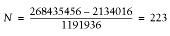
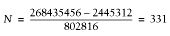
Even in our very simple case using the same formula, what do we see?
Let's again assume that we have 256 MB dedicated for
mod_perl.
Version 1:
Version 3:
If we preload CGI.pm and precompile a few methods
that we use in the test script, we can have 50% more child processes
than when we don't preload and precompile the
methods that we are going to use.
Note that CGI.pm Versions 3.x are supposed to
be
much
less
bloated, but make sure to test your code as we just demonstrated.
10.1.6. Memory Preallocation
Perl reuses allocated memory
whenever possible. With
Devel::Peek we can actually see this happening by
peeking at the variable data structure. Consider the simple code in
Example 10-12.
Example 10-12. realloc.pl
use Devel::Peek;
foo( ) for 1..2;
sub foo {
my $sv;
Dump $sv;
print "----\n";
$sv = 'x' x 100_000;
$sv = "";
Dump $sv;
print "\n\n";
}
The code starts by loading the Devel::Peek module
and calling the function foo( ) twice in the
for loop.
The foo( ) function declares a lexically scoped
variable, $sv (scalar value). Then it dumps the
$sv data structure and prints a separator, assigns
a string of 100,000 x characters to
$sv, assigns it to an empty string, and prints the
$sv data structure again. At the end, a separator
of two empty lines is printed.
Let's observe the output generated by this code:
SV = NULL(0x0) at 0x80787c0
REFCNT = 1
FLAGS = (PADBUSY,PADMY)
----
SV = PV(0x804c6c8) at 0x80787c0
REFCNT = 1
FLAGS = (PADBUSY,PADMY,POK,pPOK)
PV = 0x8099d98 ""\0
CUR = 0
LEN = 100001
SV = PV(0x804c6c8) at 0x80787c0
REFCNT = 1
FLAGS = (PADBUSY,PADMY)
PV = 0x8099d98 ""\0
CUR = 0
LEN = 100001
----
SV = PV(0x804c6c8) at 0x80787c0
REFCNT = 1
FLAGS = (PADBUSY,PADMY,POK,pPOK)
PV = 0x8099d98 ""\0
CUR = 0
LEN = 100001
In this output, we are interested in the values of
PV—the memory address of the string value,
and LEN—the length of the allocated memory.
When foo( ) is called for the first time and the
$sv data structure is dumped for the first time,
we can see that no data has yet been assigned to it. The second time
the $sv data structure is dumped, we can see that
while $sv contains an empty string, its data
structure still kept all the memory allocated for the long string.
Notice that $sv is declared with my(
), so at the end of the function foo( )
it goes out of scope (i.e., it is destroyed). To our surprise, when
we observe the output from the second call to foo(
), we discover that when $sv is declared
at the beginning of foo( ), it reuses the data
structure from the previously destroyed $sv
variable—the PV field contains the same
memory address and the LEN field is still 100,101
characters long.
If we had asked for a longer memory chunk during the second
invocation, Perl would have called realloc( ) and
a new chunk of memory would have been allocated.
Therefore, if you have some kind of buffering variable that will grow
over the processes life, you may want to preallocate the memory for
this variable. For example, if you know a variable
$Book::Buffer::buffer may grow to the size of
100,000 characters, you can preallocate the memory in the following
way:
package Book::Buffer;
my $buffer;
sub prealloc { $buffer = ' ' x 100_000; $buffer = ""; 0;}
# ...
1;
You should load this module during the
PerlChildInitHandler. In
startup.pl, insert:
use Book::Buffer;
Apache->push_handlers(PerlChildInitHandler => \&Book::Buffer::prealloc);
so each child will allocate its own memory for the variable. When
$Book::Buffer::bufferstarts growing at runtime,
no time will be wasted on memory reallocation as long as the
preallocated memory is sufficient.

9.6. References
10.2. Forking and Executing Subprocessesfrom mod_perl