Before working on Squid's configuration,
let's take a look at what we are already running and
what we want from Squid.
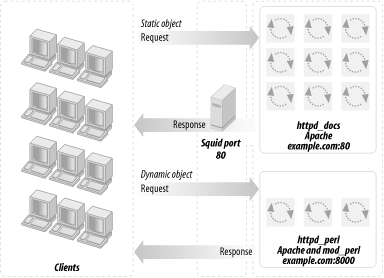
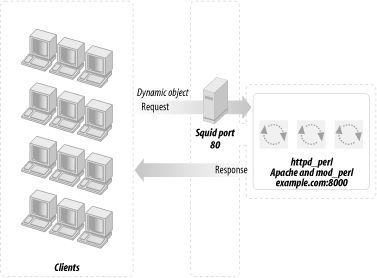
Figure 12-4. A Squid proxy server, standalone Apache, and mod_perl-enabled Apache
A proxy server makes all the magic behind it transparent to users.
Both Apache servers return the data to Squid (unless it was already
cached by Squid). The client never sees the actual ports and never
knows that there might be more than one server running. Do not
confuse this scenario with mod_rewrite, where a server redirects the
request somewhere according to the rewrite rules and forgets all
about it (i.e., works as a one-way dispatcher, responsible for
dispatching the jobs but not for collecting the results).
Squid can be used as a straightforward proxy server. ISPs and big
companies generally use it to cut down the incoming traffic by
caching the most popular requests. However, we want to run it in
httpd accelerator mode. Two configuration
directives, httpd_accel_host and
httpd_accel_port, enable this mode. We will see
more details shortly.
If you are currently using Squid in the regular proxy mode, you can
extend its functionality by running both modes concurrently. To
accomplish this, you can extend the existing Squid configuration with
httpd accelerator mode's
related directives or you can just create a new configuration from
scratch.
First we want to enable the redirect feature, so we can serve
requests using more than one server (in our case we have two: the
httpd_docs and httpd_perl
servers). So we specify httpd_accel_host as
virtual. (This assumes that your server has
multiple interfaces—Squid will bind to all of them.)
httpd_accel_host virtual
Then we define the default port to which the requests will be sent,
unless they're redirected. We assume that most
requests will be for static documents (also, it's
easier to define redirect rules for the mod_perl server because of
the URI that starts with /perl or similar). We
have our httpd_docs listening on port 81:
httpd_accel_port 81
And Squid listens to port 80:
http_port 80
We do not use icp (icp is used
for cache sharing between neighboring machines, which is more
relevant in the proxy mode):
icp_port 0
hierarchy_stoplist defines a list of words that,
if found in a URL, cause the object to be handled directly by the
cache. Since we told Squid in the previous directive that we
aren't going to share the cache between neighboring
machines, this directive is irrelevant. In case you do use this
feature, make sure to set this directive to something like:
hierarchy_stoplist /cgi-bin /perl
where /cgi-bin and /perl
are aliases for the locations that handle the dynamic requests.
Now we tell Squid not to cache dynamically generated pages:
acl QUERY urlpath_regex /cgi-bin /perl
no_cache deny QUERY
Please note that the last two directives are controversial ones. If
you want your scripts to be more compliant with the HTTP standards,
according to the HTTP specification, the headers of your scripts
should carry the caching directives: Last-Modified
and Expires.
What are they for? If you set the headers correctly, there is no need
to tell the Squid accelerator not to try to
cache anything. Squid will not bother your mod_perl servers a second
time if a request is (a) cacheable and (b) still in the cache. Many
mod_perl applications will produce identical results on identical
requests if not much time has elapsed between the requests. So your
Squid proxy might have a hit ratio of 50%, which means that the
mod_perl servers will have only half as much work to do as they did
before you installed Squid (or mod_proxy).
If you are lazy, or just have too many things to deal with, you can
leave the above directives the way we described. Just keep in mind
that one day you will want to reread this section to squeeze even
more power from your servers without investing money in more memory
and better hardware.
While testing, you might want to enable the debugging options and
watch the log files in the directory
/var/log/squid/. But make sure to turn debugging
off in your production server. Below we show it commented out, which
makes it disabled, since it's disabled by default.
Debug option 28 enables the debugging of the access-control routes;
for other debug codes, see the documentation embedded in the default
configuration file that comes with Squid.
We need to provide a way for Squid to dispatch requests to the
correct servers. Static object requests should be redirected to
httpd_docs unless they are already cached, while
requests for dynamic documents should go to the
httpd_perl server. The configuration:
tells Squid to fire off 10 redirect daemons at the specified path of
the redirect daemon and (as suggested by Squid's
documentation) disables rewriting of any Host:
headers in redirected requests. The redirection daemon script is
shown later, in Example 12-1.
Then we have access permissions, which we will not explain here. You
might want to read the documentation, so as to avoid any security
problems.
The Squid documentation warns that the actual size of Squid can grow
to be three times larger than the value you set.
You should also keep pools of allocated (but unused) memory available
for future use:
(if you have the memory available, of course—otherwise, turn it
off).
If you are not using this script to manage the Squid server remotely,
you should disable it:
Example 12-1. redirect.pl
#!/usr/bin/perl -p
BEGIN { $|=1 }
s|www.example.com(?::81)?/perl/|www.example.com:8000/perl/|;
The regular expression in this script matches all the URIs that
include either the string
"www.example.com/perl/" or the
string "www.example.com:81/perl/"
and replaces either of these strings with
"www.example.com:8080/perl". No
matter whether the regular expression worked or not, the
$_ variable is automatically printed, thanks to
the -p switch.
You must disable buffering in the redirector script.
$|=1; does the job. If you do not disable
buffering, STDOUT will be flushed only when its
buffer becomes full—and its default size is about 4,096
characters. So if you have an average URL of 70 characters, only
after about 59 (4,096/70) requests will the buffer be flushed and
will the requests finally reach the server. Your users will not wait
that long (unless you have hundreds of requests per second, in which
case the buffer will be flushed very frequently because
it'll get full very fast).
If you think that this is a very ineffective way to redirect, you
should consider the following explanation. The redirector runs as a
daemon; it fires up N redirect daemons, so there
is no problem with Perl interpreter loading. As with mod_perl, the
Perl interpreter is always present in memory and the code has already
been compiled, so the redirect is very fast (not much slower than if
the redirector was written in C). Squid keeps an open pipe to each
redirect daemon; thus, the system calls have no overhead.
Now it is time to restart the server:
/etc/rc.d/init.d/squid restart
Now the Squid server setup is complete.
If on your setup you discover that port 81 is showing up in the URLs
of the static objects, the solution is to make both the Squid and
httpd_docs servers listen to the same port. This
can be accomplished by binding each one to a specific interface (so
they are listening to different sockets). Modify
httpd_docs/conf/httpd.conf as follows:
Port 80
BindAddress 127.0.0.1
Listen 127.0.0.1:80
Now the httpd_docs server is listening only to
requests coming from the local server. You cannot access it directly
from the outside. Squid becomes a gateway that all the packets go
through on the way to the httpd_docs server.
Modify squid.conf as follows:
http_port example.com:80
tcp_outgoing_address 127.0.0.1
httpd_accel_host 127.0.0.1
httpd_accel_port 80
It's important that http_port
specifies the external hostname, which doesn't map
to 127.0.0.1, because otherwise the httpd_docs
and Squid server cannot listen to the same port on the same address.
Now restart the Squid and httpd_docs servers (it
doesn't matter which one you start first), and
voilà—the port number is gone.
You must also have the following entry in the file
/etc/hosts (chances are that
it's already there):
127.0.0.1 localhost.localdomain localhost
Now if your scripts are generating HTML including fully qualified
self references, using 8000 or the other port, you should fix them to
generate links to point to port 80 (which means not using the port at
all in the URI). If you do not do this, users will bypass Squid and
will make direct requests to the mod_perl server's
port. As we will see later, just like with
httpd_docs, the httpd_perl
server can be configured to listen only to requests coming from
localhost (with Squid forwarding these requests
from the outside). Then users will not be able to bypass Squid.