Apache's mod_proxy module
implements a proxy and cache for Apache. It implements proxying
capabilities for the following protocols: FTP, CONNECT (for SSL),
HTTP/0.9, HTTP/1.0, and HTTP/1.1. The module can be configured to
connect to other proxy modules for these and other protocols.
mod_proxy is part of Apache, so there is no need to install a
separate server—you just have to enable this module during the
Apache build process or, if you have Apache compiled as a DSO, you
can compile and add this module after you have completed the build of
Apache.
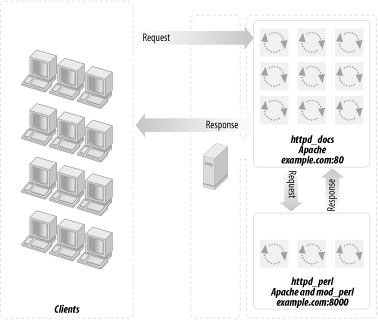
A setup with a mod_proxy-enabled server and a mod_perl-enabled server
is depicted in Figure 12-6.
Figure 12-6. mod_proxy-enabled Apache and mod_perl-enabled Apache
We do not think the difference in speed between
Apache's mod_proxy and Squid is relevant for most
sites, since the real value of what they do is buffering for slow
client connections. However, Squid runs as a single process and
probably consumes fewer system resources.
The trade-off is that mod_rewrite is easy to use if you want to
spread parts of the site across different backend servers, while
mod_proxy knows how to fix up redirects containing the backend
server's idea of the location. With Squid you can
run a redirector process to proxy to more than one backend, but there
is a problem in fixing redirects in a way that keeps the
client's view of both server names and port numbers
in all cases.
The difficult case is where you have DNS aliases that map to the same
IP address, you want them redirected to port 80 (although the server
is on a different port), and you want to keep the specific name the
browser has already sent so that it does not change in the
client's browser's location window.
The advantages of mod_proxy are:
No additional server is needed. We keep the plain one plus one
mod_perl-enabled Apache server. All you need is to enable mod_proxy
in the httpd_docs server and add a few lines to
the httpd.conf file.
The ProxyPass directive triggers the proxying
process. A request for http://example.com/perl/
is proxied by issuing a request for
http://localhost:81/perl/ to the mod_perl
server. mod_proxy then sends the response to the client. The URL
rewriting is transparent to the client, except in one case: if the
mod_perl server issues a redirect, the URL to redirect to will be
specified in a Location header in the response.
This is where ProxyPassReverse kicks in: it scans
Location headers from the responses it gets from
proxied requests and rewrites the URL before forwarding the response
to the client.
It buffers mod_perl output like Squid does.
It does caching, although you have to produce correct
Content-Length, Last-Modified,
and Expires HTTP headers for it to work. If some
of your dynamic content does not change frequently, you can
dramatically increase performance by caching it with mod_proxy.
ProxyPass happens before the authentication phase,
so you do not have to worry about authenticating twice.
Apache is able to accelerate secure HTTP requests completely, while
also doing accelerated HTTP. With Squid you have to use an external
redirection program for that.
The latest mod_proxy module (for Apache 1.3.6 and later) is reported
to be very stable.
12.7.1. Concepts and Configuration Directives
In the following explanation, we will use
www.example.com as the main server users access
when they want to get some kind of service and
backend.example.com as the machine that does the
heavy work. The main and backend servers are different; they may or
may not coexist on the same machine.
We'll use the mod_proxy module built into the main
server to handle requests to www.example.com.
For the sake of this discussion it doesn't matter
what functionality is built into the
backend.example.com server—obviously
it'll be mod_perl for most of us, but this technique
can be successfully applied to other web programming languages (PHP,
Java, etc.).
12.7.1.1. ProxyPass
You can use the ProxyPass
configuration directive to map remote hosts into the URL space of the
local server; the local server does not act as a proxy in the
conventional sense, but appears to be a mirror of the remote server.
Let's explore what this rule does:
ProxyPass /perl/ http://backend.example.com/perl/
When a user initiates a request to
http://www.example.com/perl/foo.pl, the request
is picked up by mod_proxy. It issues a request for
http://backend.example.com/perl/foo.pl and
forwards the response to the client. This reverse proxy process is
mostly transparent to the client, as long as the response data does
not contain absolute URLs.
One such situation occurs when the backend server issues a redirect.
The URL to redirect to is provided in a Location
header in the response. The backend server will use its own
ServerName and Port to build
the URL to redirect to. For example, mod_dir will redirect a request
for http://www.example.com/somedir/ to
http://backend.example.com/somedir/ by issuing a
redirect with the following header:
Location: http://backend.example.com/somedir/
Since ProxyPass forwards the response unchanged to
the client, the user will see
http://backend.example.com/somedir/ in her
browser's location window, instead of
http://www.example.com/somedir/.
You have probably noticed many examples of this from real-life web
sites you've visited. Free email service providers
and other similar heavy online services display the login or the main
page from their main server, and then when you log in you see
something like x11.example.com, then
w59.example.com, etc. These are the backend
servers that do the actual work.
Obviously this is not an ideal solution, but since users
don't usually care about what they see in the
location window, you can sometimes get away with this approach. In
the following section we show a better solution that solves this
issue and provides even more useful functionalities.
12.7.1.2. ProxyPassReverse
This
directive lets Apache adjust the URL
in the Location header on HTTP redirect responses.
This is essential when Apache is used as a reverse proxy to avoid
bypassing the reverse proxy because of HTTP redirects on the backend
servers. It is generally used in conjunction with the
ProxyPass directive to build a complete frontend
proxy server.
When a user initiates a request to
http://www.example.com/perl/foo, the request is
proxied to http://backend.example.com/perl/foo.
Let's say the backend server responds by issuing a
redirect for
http://backend.example.com/perl/foo/ (adding a
trailing slash). The response will include a
Location header:
Location: http://backend.example.com/perl/foo/
ProxyPassReverse on the frontend server will
rewrite this header to:
Location: http://www.example.com/perl/foo/
This happens completely transparently. The end user is never aware of
the URL rewrites happening behind the scenes.
Note that this ProxyPassReverse directive can also
be used in conjunction with the proxy pass-through feature of
mod_rewrite, described later in this chapter.
12.7.1.3. Security issues
Whenever you
use mod_proxy you need to make sure that your server will not become
a proxy for freeriders. Allowing clients to issue proxy requests is
controlled by the ProxyRequests directive. Its
default setting is Off, which means proxy requests
are handled only if generated internally (by
ProxyPass or RewriteRule...[P]
directives). Do not use the ProxyRequests
directive on your reverse proxy servers.
12.7.2. Knowing the Proxypassed Connection Type
Let's say that you have a frontend server running
mod_ssl, mod_rewrite, and mod_proxy. You want to make sure that your
user is using a secure connection for some specific actions, such as
login information submission. You don't want to let
the user log in unless the request was submitted through a secure
port.
Since you have to proxypass the request between the frontend and
backend servers, you cannot know where the connection originated. The
HTTP headers cannot reliably provide this information.
A possible solution for this problem is to have the mod_perl server
listen on two different ports (e.g., 8000 and 8001) and have the
mod_rewrite proxy rule in the regular server redirect to port 8000
and the mod_rewrite proxy rule in the SSL virtual host redirect to
port 8001. Under the mod_perl server, use
$r->connection->port or the environment
variable PORT to tell if the connection is secure.
12.7.3. Buffering Feature
In addition to correcting
the URI on its way back from the backend server, mod_proxy, like
Squid, also provides buffering services that benefit mod_perl and
similar heavy modules. The buffering feature allows mod_perl to pass
the generated data to mod_proxy and move on to serve new requests,
instead of waiting for a possibly slow client to receive all the
data.
mod_perl streams the generated response into the kernel send buffer,
which in turn goes into the kernel receive buffer of mod_proxy via
the TCP/IP connection. mod_proxy then streams the file into the
kernel send buffer, and the data goes to the client over the TCP/IP
connection. There are four buffers between mod_perl and the client:
two kernel send buffers, one receive buffer, and finally the
mod_proxy user space buffer. Each of those buffers will take the data
from the previous stage, as long as the buffer is not full. Now
it's clear that in order to immediately release the
mod_perl process, the generated response should fit into these four
buffers.
If the data doesn't fit immediately into all
buffers, mod_perl will wait until the first kernel buffer is emptied
partially or completely (depending on the OS implementation) and then
place more data into it. mod_perl will repeat this process until the
last byte has been placed into the buffer.
The kernel's receive buffers
(recvbuf) and send buffers
(sendbuf) are used for different things: the
receive buffers are for TCP data that hasn't been
read by the application yet, and the send buffers are for application
data that hasn't been sent over the network yet. The
kernel buffers actually seem smaller than their declared size,
because not everything goes to actual TCP/IP data. For example, if
the size of the buffer is 64 KB, only about 55 KB or so can actually
be used for data. Of course, the overhead varies from OS to OS.
It might not be a very good idea to increase the
kernel's receive buffer too much, because you could
just as easily increase mod_proxy's user space
buffer size and get the same effect in terms of buffering capacity.
Kernel memory is pinned (not swappable), so
it's harder on the system to use a lot of it.
The user space buffer size for mod_proxy seems to be fixed at 8 KB,
but changing it is just a matter of replacing
HUGE_STRING_LEN with something else in
src/modules/proxy/proxy_http.c under the Apache
source distribution.
mod_proxy's receive buffer is configurable by the
ProxyReceiveBufferSize parameter. For example:
ProxyReceiveBufferSize 16384
will create a buffer 16 KB in size.
ProxyReceiveBufferSize must be bigger than or
equal to 512 bytes. If it's not set or is set to
0, the system default will be used. The number
it's set to should be an integral multiple of 512.
ProxyReceiveBufferSize cannot be bigger than the
kernel receive buffer size; if you set the value of
ProxyReceiveBufferSize larger than this size, the
default value will be used (a warning will be printed in this case by
mod_proxy).
You can modify the source code to adjust the size of the
server's internal read-write buffers by changing the
definition of IOBUFSIZE in
include/httpd.h.
Unfortunately, you cannot set the kernel buffers'
sizes as large as you might want because there is a limit to the
available physical memory and OSes have their own upper limits on the
possible buffer size. To increase the physical memory limits, you
have to add more RAM. You can change the OS limits as well, but these
procedures are very specific to OSes. Here are some of the OSes and
the procedures to increase their socket buffer sizes:

Linux
For 2.2 kernels, the maximum
limit for receive buffer size is set in
/proc/sys/net/core/rmem_max and the default
value is in /proc/sys/net/core/rmem_default. If
you want to increase the rcvbufsize above
65,535 bytes, the default maximum value, you have to first raise the
absolute limit in /proc/sys/net/core/rmem_max.
At runtime, execute this command to raise it to 128 KB:
panic# echo 131072 > /proc/sys/net/core/rmem_max
You probably want to put this command into
/etc/rc.d/rc.local (or elsewhere, depending on
the operating system and the distribution) or a similar script that
is executed at server startup, so the change will take effect at
system reboot.
For the 2.2.5 kernel, the maximum and default values are either 32 KB
or 64 KB. You can also change the default and maximum values during
kernel compilation; for that, you should alter the
SK_RMEM_DEFAULT and SK_RMEM_MAX
definitions, respectively. (Since kernel source files tend to change,
use the grep(1) utility to find the files.)
The same applies for the write buffers. You need to adjust
/proc/sys/net/core/wmem_max and possibly the
default value in
/proc/sys/net/core/wmem_default. If you want to
adjust the kernel configuration, you have to adjust the
SK_WMEM_DEFAULT and SK_WMEM_MAX
definitions, respectively.
FreeBSD
Under FreeBSD
it's possible to configure the kernel to have bigger
socket buffers:
panic# sysctl -w kern.ipc.maxsockbuf=2621440
Solaris
Under Solaris this upper limit
is specified by the tcp_max_buf parameter; its
default value is 256 KB.
This buffering technique applies only to downstream
data (data coming from the origin server to the proxy),
not to upstream data. When the server gets an incoming stream,
because a request has been issued, the first bits of data hit the
mod_perl server immediately. Afterward, if the request includes a lot
of data (e.g., a big POST request, usually a file
upload) and the client has a slow connection, the mod_perl process
will stay tied, waiting for all the data to come in (unless it
decides to abort the request for some reason). Falling back on
mod_cgi seems to be the best solution for specific scripts whose
major function is receiving large amounts of upstream data. Another
alternative is to use yet another mod_perl server, which will be
dedicated to file uploads only, and have it serve those specific URIs
through correct proxy configuration.
12.7.4. Closing Lingering Connections with lingerd
Because of
some technical complications in
TCP/IP, at the end of each client connection, it is not enough for
Apache to close the socket and forget about it; instead, it needs to
spend about one second lingering (waiting) on
the client.[43]
lingerd is a daemon (service) designed to take
over the job of properly closing network connections from an HTTP
server such as Apache and immediately freeing it to handle new
connections.
lingerd can do an effective job only if HTTP
KeepAlives are turned off. Since
Keep-Alives are useful for images, the recommended
setup is to serve dynamic content with mod_perl-enabled Apache and
lingerd, and static content with plain Apache.
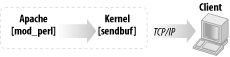
With a lingerdsetup, we don't
have the proxy (we don't want to use
lingerd on our httpd_docs
server, which is also our proxy), so the buffering chain we presented
earlier for the proxy setup is much shorter here (see Figure 12-8).
Figure 12-8. Shorter buffering chain
Hence, in this setup it becomes more important to have a big enough
kernel send buffer.
With lingerd, a big enough kernel send buffer, and
KeepAlives off, the job of spoonfeeding the data
to a slow client is done by the OS kernel in the background. As a
result, lingerd makes it possible to serve the
same load using considerably fewer Apache processes. This translates
into a reduced load on the server. It can be used as an alternative
to the proxy setups we have seen so far.
Apache does
caching as well. It's relevant to mod_perl only if
you produce proper headers, so your scripts' output
can be cached. See the Apache documentation for more details on the
configuration of this capability.
To enable caching, use the CacheRoot directive,
specifying the directory where cache files are to be saved:
CacheRoot /usr/local/apache/cache
Make sure that directory is writable by the user under which
httpd is running.
The CacheSize directive sets the desired space
usage in kilobytes:
CacheSize 50000 # 50 MB
Garbage collection, which enforces the cache size, is set in hours by
the CacheGcInterval. If unspecified, the cache
size will grow until disk space runs out. This setting tells
mod_proxy to check that your cache doesn't exceed
the maximum size every hour:
CacheGcInterval 1
CacheMaxExpirespecifies the maximum number of
hours for which cached documents will be retained without checking
the origin server:
CacheMaxExpire 72
If the origin server for a document did not send an expiry date in
the form of an Expires header, then the
CacheLastModifiedFactor will be used to estimate
one by multiplying the factor by the time the document was last
modified, as supplied in the Last-Modified header.
CacheLastModifiedFactor 0.1
If the content was modified 10 hours ago, mod_proxy will assume an
expiration time of 10 × 0.1 = 1 hour. You should set this
according to how often your content is updated.
If neither Last-Modified nor
Expires is present, the
CacheDefaultExpire directive specifies the number
of hours until the document is expired from the cache:
CacheDefaultExpire 24
12.7.6. Build Process
To build
mod_proxy
into Apache, just add —enable-module=proxy
during the Apache ./configurestage. Since you
will probably need mod_rewrite's capability as well,
enable it with —enable-module=rewrite.