Contents


On-line Guides
All Guides
Linux for Beginners
Office Productivity
Linux Installation
Linux Security
Linux Utilities
Linux Virtualization
Linux Kernel
System/Network Admin
Programming
Scripting Languages
Development Tools
Web Development
GUI Toolkits/Desktop
Databases
Mail Systems

How To Guides
Xen Virtualization
General System Admin
Linux Security
Linux Filesystems
Web Servers
Graphics & Desktop
PC Hardware
Windows
Problem Solutions


SUSE Linux Enterprise Server (SLES 10) Installation and Administration
Previous Page Home Next Page

39.1 Importing File Systems with YaST

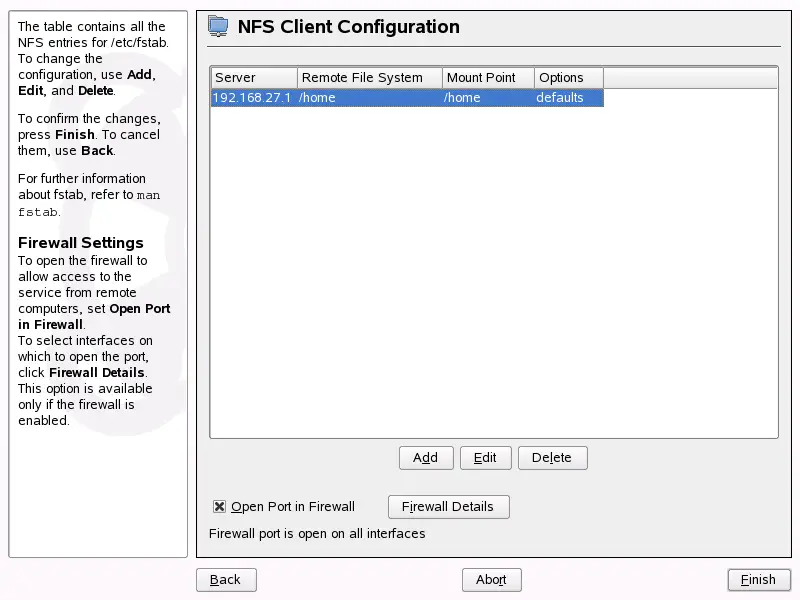
Users authorized to do so can mount NFS directories from an NFS server into their own file trees. This can be achieved most easily using the YaST module NFS Client. Just enter the hostname of the NFS server, the directory to import, and the mount point at which to mount this directory locally. All this is done after Add is clicked in the first dialog. Click Open Port in Firewall to open the firewall to allow access to the service from remote computers. The firewall status is displayed next to the check box. Clicking OK saves your changes. See Figure 39-1.

Figure 39-1 NFS Client Configuration with YaST

SUSE Linux Enterprise Server (SLES 10) Installation and Administration
Previous Page Home Next Page


  Published Courtesy of Novell, Inc. Design by Interspire