It's a known fact
that programmers spend a lot of time debugging their code. Sometimes
we spend more time debugging code than writing it. The
lion's share of the time spent on debugging is spent
on finding the cause of the bug and trying to reproduce the bug at
will. Usually it takes little time to fix the problem once
it's understood.
A typical Perl program relies on many other modules written by other
developers. Hence, no matter how good your code is, often you have to
deal with bugs in the code written by someone else. No matter how
hard you try to avoid learning to debug, you will have to do it at
some point. And the earlier you acquire the skills, the better.
There are several levels of
debugging complexity. The basic level is
when Perl terminates the program during the compilation phase, before
it tries to run the resulting byte code. This usually happens because
there are syntax errors in the code, or perhaps because a used module
is missing. Sometimes it takes quite an effort to solve these
problems, since code that uses Apache core modules generally
won't compile when executed from the shell. Later we
will learn how to solve syntax problems in mod_perl code quite
easily.
Once the program compiles and starts to run, various runtime errors
may happen, usually when Perl tries to interact with external
resources (e.g., trying to open a file or to open a connection to a
database). If the code validates whether such external resource calls
succeed and aborts the program with die( ) if they
do not (including a useful error message, as we explained at the
beginning of the chapter), there is nothing to debug here, because
the error message gives us all the needed information. These are not
bugs in our code, and it's expected that they may
happen. However, if the error message is incomplete (e.g., if you
didn't include $! in the error
message when attempting to open a file), or the program continues to
run, ignoring the failed call, then you have to figure out where the
badly written code is and correct it to abort on the failure,
properly reporting the problem.
Of course, there are cases where a failure to do something is not
fatal. For example, consider a program that tries to open a
connection to a database, and it's known that the
database is being stopped every so often for maintenance. Here, the
program may choose to try again and again until the database becomes
available and aborts itself only after a certain timeout period. In
such cases we hope that the logic is properly implemented, so it
won't lead to mysterious, hard-to-detect bugs.
If the running program is properly handling external resource calls,
it may still be prone to internal logical errors—i.e., when the
program doesn't do what you thought you had
programmed it to do. These are somewhat harder to solve than simple
syntax errors, especially when there is a lot of code to be inspected
and reviewed, but it's just a matter of time. Perl
can help a lot; typos can often be found simply by enabling warnings.
For example, if you wanted to compare two numbers, but you omitted
the second = character so that you had something
like if ($yes = 1) instead of if
($yes= = 1), with warnings enabled,
Perl will warn you that you may have meant = =.
The next level is when the program does what it's
expected to do most of the time, but occasionally misbehaves. Often
you'll find that print( )
statements or the Perl debugger can help, but inspection of the code
generally doesn't. Sometimes it's
easy to debug with print( ), dumping your data
structures to a log file at some point, but typing the debug messages
can become very tedious. That's where the Perl
debugger comes into its own.
While print( )statements always work, running the
Perl debugger for CGI-style scripts might be quite a challenge. But
with the right knowledge and tools handy, the debugging process
becomes much easier. Unfortunately, there is no one easy way to debug
your programs, as the debugging depends entirely on your code. It can
be a nightmare to debug really complex and obscure code, but as your
style matures you can learn ways to write simpler code that is easier
to debug. You will probably find that when you write simpler, clearer
code it does not need so much debugging in the first place.
One of the most difficult cases to debug is when the process just
terminates in the middle of processing a request and aborts with a
"Segmentation fault" error
(possibly dumping core, by creating a file called
core in the current directory of the process
that was running). Often this happens when the program tries to
access a memory area that doesn't belong to it. This
is something that you rarely see with plain Perl scripts, but it can
easily happen if you use modules whose guts are written in C or C++
and something goes wrong with them. Occasionally you will come across
a bug in mod_perl itself (mod_perl is written in C and makes
extensive use of XS macros).
In the following sections we will cover a selection of problems in
detail, thoroughly discussing them and presenting a few techniques to
solve them.
21.5.1. Locating and Correcting Syntax Errors
While developing code, we sometimes make
syntax errors, such as forgetting to put a comma in a list or a
semicolon at the end of a statement.
Don't Skimp on the Semicolons
Even at the end of a { } block,
where a semicolon is not required at the end of the last statement,
it may be better to put one in: there is a chance that you will add
more code later, and when you do you might forget to add the
now-required semicolon. Similarly, more items might be added later to
a list; unlike many other languages, Perl has no problem when you end
a list with a redundant comma.
One approach to locating syntactically
incorrect code is to execute the
script from the shell with the -c flag:
panic% perl -c test.pl
This tells Perl to check the syntax but not to run the code
(actually, it will execute BEGIN blocks,
END blocks, and use( ) calls,
because these are considered as occurring outside the execution of
your program, and they can affect whether your program compiles
correctly or not).[50]
[50]Perl 5.6.0 has introduced a new
special variable, $^C, which is set to true when
Perl is run with the -c flag; this provides an
opportunity to have some further control over
BEGIN and END blocks during
syntax checking.
When checking syntax in this way it's also a good
idea to add the -w switch to enable warnings:
panic% perl -cw test.pl
If there are errors in the code, Perl will report the errors and tell
you at which line numbers in your script the errors were found. For
example, if we create a file test.pl with the
contents:
@list = ('foo' 'bar');
and do syntax validation from the command line:
panic% perl -cw test.pl
String found where operator expected at
test.pl line 1, near "'foo' 'bar'"
(Missing operator before 'bar'?)
syntax error at test.pl line 1, near "'foo' 'bar'"
test.pl had compilation errors.
we can learn from the error message that we are missing an operator
before the 'bar' string, which is of course a
comma in this case. If we place the missing comma between the two
strings:
@list = ('foo', 'bar');
and run the test again:
panic% perl -cw test.pl
Name "main::list" used only once: possible typo at test.pl line 1.
test.pl syntax OK
we can see that the syntax is correct now. But Perl still warns us
that we have some variable that is defined but not used. Is this a
bug? Yes and no—it's what we really meant in
this example, but our example doesn't actually do
anything, so Perl is probably right to complain.
The next step is to execute the script, since in addition to syntax
errors there may be runtime errors. These are usually the errors that
cause the "Internal Server Error"
response when a page is requested by a client's
browser. With plain CGI scripts (running under mod_cgi)
it's the same as running plain Perl
scripts—just execute them and see if they work.
The whole thing is quite different with scripts that use
Apache::* modules. These can be used only from
within the mod_perl server environment. Such scripts rely on other
code, and an environment that isn't available if you
attempt to execute the script from the shell. There is no Apache
request object available to the code when it is executed from the
shell.
If you have a problem when using Apache::*
modules, you can make a request to the script from a browser and
watch the errors and warnings as they are logged to the
error_log file. Alternatively, you can use the
Apache::FakeRequest module, which tries to emulate
a request and makes it possible to debug some scripts outside the
mod_perl environment, as we will see in the next section.
21.5.2. Using Apache::FakeRequest to Debug Apache Perl Modules
Apache::FakeRequest is
used to set up an empty Apache request object that can be used for
debugging. The Apache::FakeRequest methods just
set internal variables with the same names as the methods and returns
the values of the internal variables. Initial values for methods can
be specified when the object is created. The print( )
method prints to STDOUT.
Subroutines for Apache constants are also defined so that you can use
Apache::Constants while debugging, although the
values of the constants are hardcoded rather than extracted from the
Apache source code.
Example 21-2 is a very simple module that prints a
brief message to the client's browser.
Example 21-2. Book/Example.pm
package Book::Example;
use Apache::Constants qw(OK);
sub handler {
my $r = shift;
$r->send_http_header('text/plain');
print "You are OK ", $r->get_remote_host, "\n";
return OK;
}
1;
You cannot debug this module unless you configure the server to run
it, by calling its handler from somewhere. So, for example, you could
put in httpd.conf:
Then, after restarting the server, you could start a browser, request
the location http://localhost/ex, and examine
the output. Tedious, no?
With the help of Apache::FakeRequest, you can
write a little
script that will emulate
a request and return the output (see Example 21-3).
Example 21-3. fake.pl
#!/usr/bin/perl
use Apache::FakeRequest ( );
use Book::Example ( );
my $r = Apache::FakeRequest->new('get_remote_host'=>'www.example.com');
Book::Example::handler($r);
When you execute the script from the command line, you will see the
following output as the body of the response:
You are OK www.example.com
As you can see, when Apache::FakeRequest was
initialized, we hardcoded the Apache method get_remote_host(
) with a static value.
At the time of this writing, Apache::FakeRequest
is far from being complete, but you may still find it useful.
If while developing your code you have to switch back and forth
between the normal and fake modes, you may want to start your code in
this way:
use constant MOD_PERL => $ENV{MOD_PERL};
my $r;
if (MOD_PERL) {
$r = Apache->request;
} else {
require Apache::FakeRequest;
$r = Apache::FakeRequest->new;
}
When you run from the command line, the fake request will be used;
otherwise, the usual method will be used.
21.5.3. Using print( ) for Debugging
The universal debugging tool across nearly
all platforms and programming languages is printf(
) (or equivalent output functions). This function can send
data to the console, a file, an application window, and so on. In
Perl we generally use the print( ) function. With
an idea of where and when the bug is triggered, a developer can
insert print( )statements into the source code to
examine the value of data at certain stages of execution.
However, it is rather difficult to anticipate all the possible
directions a program might take and what data might cause trouble. In
addition, inline debugging code tends to add bloat and degrade the
performance of an application and can also make the code harder to
read and maintain. Furthermore, you have to comment out or remove the
debugging print( ) calls when you think that you
have solved the problem, and if later you discover that you need to
debug the same code again, you need at best to uncomment the
debugging code lines or, at worst, to write them again from scratch.
The constant pragma helps
here. You can leave some debug printings in production code, without
adding extra processing overhead, by using constants. For example,
while developing the code, you can define a constant
DEBUG whose value is 1:
package Foo;
use constant DEBUG => 1;
...
warn "entering foo" if DEBUG;
...
The warning will be printed, since DEBUG returns
true. In production you just have to turn off the constant:
use constant DEBUG => 0;
When the code is compiled with a false DEBUG
value, all those statements that are to be executed if
DEBUG has a true value will be removed on the fly
at compile time, as if they never existed. This
allows you to keep some of the important debug statements in the code
without any adverse impact on performance.
But what if you have many different debug categories and you want to
be able to turn them on and off as you need them? In this case, you
need to define a constant for each category. For example:
use constant DEBUG_TEMPLATE => 1;
use constant DEBUG_SESSION => 0;
use constant DEBUG_REQUEST => 0;
Now if in your code you have these three debug statements:
warn "template" if DEBUG_TEMPLATE;
warn "session" if DEBUG_SESSION;
warn "request" if DEBUG_REQUEST;
only the first one will be executed, as it's the
only one that has a condition that evaluates to true.
Let's look at a few examples where we use
print( ) to debug some problem.
In one of our applications, we wrote a function that returns a date
from one week ago. This function (including the code that calls it)
is shown in Example 21-4.
Example 21-4. date_week_ago.pl
print "Content-type: text/plain\n\n";
print "A week ago the date was ",date_a_week_ago( ),"\n";
# return a date one week ago as a string in format: MM/DD/YYYY
sub date_a_week_ago {
my @month_len = (31, 28, 31, 30, 31, 30, 31, 31, 30, 31, 30, 31);
my($day, $month, $year) = (localtime)[3..5];
for (my $j = 0; $j < 7; $j++) {
$day--;
if ($day = = 0) {
$month--;
if ($month = = 0) {
$year--;
$month = 12;
}
# there are 29 days in February in a leap year
$month_len[1] =
($year % 400 = = 0 or ($year % 4 = = 0 and $year % 100))
? 29 : 28;
# set $day to be the last day of the previous month
$day = $month_len[$month - 1];
}
}
return sprintf "%02d/%02d/%04d", $month, $day, $year+1900;
}
This code is pretty straightforward. We get today's
date and subtract 1 from the value of the day we get, updating the
month and the year on the way if boundaries are being crossed (end of
month, end of year). If we do it seven times in a loop, at the end we
should get a date from a week ago.
Note that since localtime( ) returns the year as a
value of current_year-1900 (which means that we
don't have a century boundary to worry about), if we
are in the middle of the first week of the year 2000, the value of
$year returned by localtime( ) will be
100 and not 0, as one might
mistakenly assume. So when the code does $year--
it becomes 99, not -1. At the
end, we add 1900 to get back the correct four-digit year format. (If
you plan to work with years before 1900, add 1900 to
$year before the for loop.)
Also note that we have to account for leap years, where there are 29
days in February. For the other months, we have prepared an array
containing the month lengths. A specific year is a leap year if it is
either evenly divisible by 400 or evenly divisible by 4 and not
evenly divisible by 100. For example, the year 1900 was not a leap
year, but the year 2000 was a leap year. Logically written:
Now when we run the script and check the result, we see that
something is wrong. For example, if today is 10/23/1999, we expect
the above code to print 10/16/1999. In fact, it
prints 09/16/1999, which means that we have lost a
month. The above code is buggy!
Let's put a few debug print( )
statements in the code, near the $month variable:
sub date_a_week_ago {
my @month_len = (31, 28, 31, 30, 31, 30, 31, 31, 30, 31, 30, 31);
my($day, $month, $year) = (localtime)[3..5];
print "[set] month : $month\n"; # DEBUG
for (my $j = 0; $j < 7; $j++) {
$day--;
if ($day = = 0) {
$month--;
if ($month = = 0) {
$year--;
$month = 12;
}
print "[loop $i] month : $month\n"; # DEBUG
# there are 29 days in February in a leap year
$month_len[1] =
($year % 400 = = 0 or ($year % 4 = = 0 and $year % 100))
? 29 : 28;
# set $day to be the last day of the previous month
$day = $month_len[$month - 1];
}
}
return sprintf "%02d/%02d/%04d", $month, $day, $year+1900;
}
When we run it we see:
[set] month : 9
This is supposed to be the number of the current month
(10). We have spotted a bug, since the only code
that sets the $month variable consists of a call
to localtime( ). So did we find a bug in Perl?
Let's look at the manpage of the localtime(
) function:
panic% perldoc -f localtime
Converts a time as returned by the time function to a 9-element array with the time
analyzed for the local time zone. Typically used as follows:
# 0 1 2 3 4 5 6 7 8
($sec,$min,$hour,$mday,$mon,$year,$wday,$yday,$isdst) = localtime(time);
All array elements are numeric, and come straight out of a struct tm. In particular
this means that $mon has the range 0..11 and $wday has the range 0..6 with Sunday as
day 0. Also, $year is the number of years since 1900, that is, $year is 123 in year
2023, and not simply the last two digits of the year. If you assume it is, then you
create non-Y2K-compliant programs--and you wouldn't want to do that, would you?
[more info snipped]
This reveals that if we want to count months from 1 to 12 and not 0
to 11 we are supposed to increment the value of
$month. Among other interesting facts about
localtime( ), we also see an explanation of
$year, which, as we've mentioned
before, is set to the number of years since 1900.
We have found the bug in our code and learned new things about
localtime( ). To correct the above code, we just
increment the month after we call localtime( ):
Other places where programmers often make mistakes are conditionals
and loop statements. For example, will the block in this loop:
my $c = 0;
for (my $i=0; $i <= 3; $i++) {
$c += $i;
}
be executed three or four times?
If we plant the print( ) debug statement:
my $c = 0;
for (my $i=0; $i <= 3; $i++) {
$c += $i;
print $i+1,"\n";
}
and execute it:
1
2
3
4
we see that it gets executed four times. We could have figured this
out by inspecting the code, but what happens if instead of
3, there is a variable whose value is known only
at runtime? Using debugging print( )statements
helps to determine whether to use < or
<= to get the boundary condition right.
Here you can plainly see that the loop is executed four times.
The same goes for conditional statements. For example, assuming that
$a and $b are integers, what is
the value of this statement?
$c = $a > $b and $a < $b ? 1 : 0;
One might think that $c is always set to zero,
since:
$a > $b and $a < $b
is a false statement no matter what the values of
$a and $b are. But
C$ is not set to zero—it's
set to 1 (a true value) if $a >
$b; otherwise, it's set to
undef (a false value). The reason for this
behavior lies in operator precedence. The operator
and (AND) has lower precedence than the operator
= (ASSIGN); therefore, Perl sees the statement
like this:
($c = ($a > $b) ) and ( $a < $b ? 1 : 0 );
which is the same as:
if ($c = $a > $b) {
$a < $b ? 1 : 0;
}
So the value assigned to $c is the result of the
logical expression:
$a > $b
Adding some debug printing will reveal this problem. The solutions
are, of course, either to use parentheses to explicitly express what
we want:
$c = ($a > $b and $a < $b) ? 1 : 0;
or to use a higher-precedence AND operator:
$c = $a > $b && $a < $b ? 1 : 0;

Now $c is always set to 0 (as
presumably we intended).[51]
[51]For more
traps, refer to the perltrap manpage.
21.5.4. Using print( ) and Data::Dumper for Debugging
Sometimes we need to peek into complex data
structures, and trying to print them out can be tricky.
That's where Data::Dumper comes
to the rescue. For example, if we create this complex data structure:
That's not what we want—we have spotted the
bug and can easily correct it.
You can use:
print STDERR Dumper $data;
or:
warn Dumper $data;
instead of printing to STDOUT, to have all the debug messages in the
error_log file. This makes it even easier to
debug your code, since the real output (which should normally go to
the browser) is not mixed up with the debug output when the code is
executed under mod_perl.
21.5.5. The Importance of a Good, Concise Coding Style
Don't strive for elegant, clever code. Try
to develop a good coding style by writing code that is concise, yet
easy to understand. It's much easier to find bugs in
concise, simple code, and such code tends to have fewer bugs.
The "one week ago" example from the
previous section is not concise. There is a lot of redundancy in it,
and as a result it is harder to debug than it needs to be. Here is a
condensed version of the main loop:
for (0..6) {
next if --$day;
$year--, $month=12 unless --$month;
$day = $month != 2
? $month_len[$month-1]
: ($year % 400 = = 0 or ($year % 4 = = 0 and $year % 100))
? 29
: 28;
}
This version may seem quite difficult to understand and even harder
to maintain, but for those who are used to reading idiomatic Perl,
part of this code is easier to understand.
Larry Wall, the author of Perl, is a linguist. He tried to define the
syntax of Perl in a way that makes working in Perl much like working
in English. So it's a good idea to learn
Perl's coding idioms—some of them might seem
odd at first, but once you get used to them, you will find it
difficult to understand how you could have lived without them.
We'll present just a few of the more common Perl
coding idioms here.
You should try to write code that is readable and avoids redundancy.
For example, it's better to write:
unless ($i) {...}
than:
if ($i = = 0) {...}
if you want to just test for truth.
Use a concise, Perlish style:
for my $j (0..6) {...}
instead of the syntax used in some other languages:
for (my $j=0; $j<=6; $j++) {...}
It's much simpler to write and comprehend code like
this:
print "something" if $debug;
than this:
if ($debug) {
print "something";
}
A good style that improves understanding and readability and reduces
the chances of having a bug is shown below, in the form of yet
another rewrite of our "one week
ago" code:
for (0..6) {
$day--;
next if $day;
$month--;
unless ($month){
$year--;
$month=12
}
if($month = = 2){ # February
$day = ($year % 400 = = 0 or ($year % 4 = = 0 and $year % 100))
? 29 : 28;
} else {
$day = $month_len[$month-1];
}
}
This is a happy medium between the excessively verbose style of the
first version and the very obscure second version.
After debugging this obscure code for a while, we came up with a much
simpler two-liner, which is much faster and easier to understand:
Just take the current date in seconds since
epoch as time( ) returns,
subtract a week in seconds (7661 × 24 × 60
× 60),[52] and feed the result to localtime(
). Voilà—we have the date of one week ago!
[52]Perl folds the constants at compile
time.
Why is the last version important, when the first one works just
fine? Not because of performance issues (although this last one is
twice as fast as the first), but because there are more chances to
have a bug in the first version than there are in the last one.
Of course, instead of inventing the date_a_week_ago(
) function and spending all this time debugging it, we
could have just used a standard module from CPAN to provide the same
functionality (with zero debugging time). In this case,
Date::Calc comes to the rescue,[53] and we will write
the code as:
[53]See also Class::Date and
Date::Manip.
use Date::Calc;
sub date_a_week_ago {
my($year,$month,$day) =
Date::Calc::Add_Delta_Days(Date::Calc::Today, -7);
return sprintf "%02d/%02d/%04d", $month, $day, $year;
}
We simply use Date::Calc::Today( ), which returns
a list of three values—year, month, and day—which are
immediately fed into the function
Date::Calc::Add_Delta_Days( ). This allows us to
get the date N days from now in either
direction. We use -7 to ask for a date from one week ago. Since we
are relying on this standard CPAN module, there is not much to debug
here; the function has no complicated logic where one can expect
bugs. In contrast, our original implementation was really difficult
to understand, and it was very easy to make mistakes.
We will use this example once again to stress that
it's better to use standard modules than to
reinvent them.
21.5.6. Introduction to the Perl Debugger
As we saw earlier, it's almost
always possible to debug code with the help of print(
). However, it is impossible to anticipate all the possible
paths of execution through a program, and difficult to know what code
to suspect when trouble occurs. In addition, inline debugging code
tends to add bloat and degrade the performance of an application,
although most applications offer inline debugging as a compile-time
option to avoid these performance hits. In any case, this information
tends to be useful only to the programmer who added the
print( )statements in the first place.
Sometimes you must debug tens of thousands of lines of Perl in an
application, and while you may be a very experienced Perl programmer
who can understand Perl code quite well just by looking at it, no
mere mortal can even begin to understand what will actually happen in
such a large application until the code is running. So to begin with
you just don't know where to add your trusty
print( )statements to see what is happening
inside.
The most effective way to track down a bug is often to run the
program inside an interactive debugger. Most programming languages
have such tools available, allowing programmers to see what is
happening inside an application while it is running. The basic
features of any
interactive debugger allow you to:
Stop at a certain point in the code, based on a routine name or
source file and line number (this point is called a break
point).
Stop at a certain point in the code, based on conditions such as the
value of a given variable (this is called a conditional
break point).
Perform an action without stopping, based on the criteria above.
View and modify the values of variables at any time.
Provide context information such as stack traces and source views.
It takes practice to learn the most effective ways of using an
interactive debugger, but the time and effort will be paid back many
times in the long run.
Perl comes with an interactive debugger
calledperldb. Giving control of your Perl program to
the interactive debugger is simply a matter of specifying the
-d command-line switch. When this switch is
used, Perl inserts debugging hooks into the program syntax tree, but
it leaves the job of debugging to a Perl module separate from the
Perl binary itself.
We will start by reviewing a few of the basic concepts and commands
provided by Perl's interactive debugger. These
examples are all run from the command line, independent of mod_perl,
but they will still be relevant when we work within Apache.
It might be useful to keep the perldebug manpage
handy for reference while reading this section, and for future
debugging sessions on your own.
The interactive debugger will attach to the current terminal and
present you with a prompt just before the first program statement is
executed. For example:
panic% perl -d -le 'print "mod_perl rules the world"'
Loading DB routines from perl5db.pl version 1.0402
Emacs support available.
Enter h or `h h' for help.
main::(-e:1): print "mod_perl rules the world"
DB<1>
The source line shown is the line that Perl is
about to execute.
Tosingle
step—i.e., execute one line at a time—use the
next command (or just
n). Each time you enter something in the
debugger, you must finish by pressing the Return key. This will cause
the line to be executed, after which execution will stop and the next
line to be executed (if any) will be displayed:
main::(-e:1): print "mod_perl rules the world"
DB<1> n
mod_perl rules the world
Debugged program terminated. Use q to quit or R to restart,
use O inhibit_exit to avoid stopping after program termination,
h q, h R or h O to get additional info.
DB<1>
In this case, our example code is only one line long, so we have
finished interacting after the first line of code is executed.
Let's try again with a slightly longer example:
my $word = 'mod_perl';
my @array = qw(rules the world);
print "$word @array\n";
Save the script in a file called domination.pl
and run it with the -d switch:
panic% perl -d domination.pl
main::(domination.pl:1): my $word = 'mod_perl';
DB<1> n
main::(domination.pl:2): my @array = qw(rules the world);
DB<1>
At this point, the first line of code has been executed and the
variable $word has been assigned the value
mod_perl. We can check this by using the
p (print) command:
main::(domination.pl:2): my @array = qw(rules the world);
DB<1> p $word
mod_perl
The print command is similar to
Perl's built-in print( )
function, but it adds a trailing newline and outputs to the
$DB::OUT file handle, which is normally opened on
the terminal from which Perl was launched. Let's
continue:
DB<2> n
main::(domination.pl:4): print "$word @array\n";
DB<2> p @array
rulestheworld
DB<3> n
mod_perl rules the world
Debugged program terminated. Use q to quit or R to restart,
use O inhibit_exit to avoid stopping after program termination,
h q, h R or h O to get additional info.
Unfortunately, p @array printed
rulestheworld and not rules the
world, as we would prefer, but that's
absolutely correct. If you print an array
without expanding it first into a string it will be printed without
adding the content of the $"
variable (otherwise known as $LIST_SEPARATOR, if
the English pragma is being used) between the
elements of the array.
If you type:
print "@array";
the output will be rules the world, since the
default value of the $" variable is a single
space.
You should have noticed by now that there is some valuable
information to the left of each executable statement:
First is the current package name (in this case,
main::). Next is the current filename and
statement line number (domination.pl and 4, in
this example). The number presented at the prompt is the command
number, which can be used to recall commands from the session
history, using the ! command followed by this
number. For example, !1 would repeat the first
command:
panic% perl -d -e0
main::(-e:1): 0
DB<1> p $]
5.006001
DB<2> !1
p $]5.006001
DB<3>
where $] is Perl's version
number. As you can see, !1 prints the value of
$], prepended by the command that was executed.
Notice that the code given to Perl to debug (with
-e) was 0—i.e., a
statement that does nothing. To use Perl as a calculator, and to
experiment with Perl expressions, it is common to enter
perl -de0, and then type in expressions and
p (print) their results.
Things start to get more interesting as the code gets more
interesting. In the script in Example 21-5,
we've increased the number of source files and
packages by including the standard Symbol module,
along with an invocation of its gensym( )
function.
Example 21-5. test_sym.pl
use Symbol ( );
my $sym = Symbol::gensym( );
print "$sym\n";
Now let's debug it:
panic% perl -d test_sym.pl
main::(test_sym.pl:3): my $sym = Symbol::gensym( );
DB<1> n
main::(test_sym.pl:5): print "$sym\n";
DB<1> n
GLOB(0x80c7a44)
Note that the debugger did not stop at the first line of the file.
This is because use... is a
compile-time statement, not a runtime statement. Also notice there
was more work going on than the debugger revealed.
That's because the next command
does not enter subroutine calls, it steps over.
To step intosubroutine code,
use the step command (or its abbreviated form,
s):
panic% perl -d test_sym.pl
main::(test_sym.pl:3): my $sym = Symbol::gensym( );
DB<1> s
Symbol::gensym(/usr/lib/perl5/5.6.1/Symbol.pm:86):
86: my $name = "GEN" . $genseq++;
DB<1>
Notice the source line information has changed to the
Symbol::gensym package and the
Symbol.pm file. We can carry on by hitting the
Return key at each prompt, which causes the debugger to repeat the
last step or next command.
It won't repeat a print
command, though. The debugger will eventually return from the
subroutine back to our main program:
Our line-by-line debugging approach has served us well for this small
program, but imagine the time it would take to step through a large
application at the same pace. There are several ways to speed up a
debugging session, one of which is known as setting a
breakpoint.
The breakpointcommand (b) is used
to tell the debugger to stop at a named subroutine or at any line of
any file. In this example session, at the first debugger prompt we
will set a breakpoint at the Symbol::gensym
subroutine, telling the debugger to stop at the first line of this
routine when it is called. Rather than moving along with
next or step, we give the
continue command (c), which
tells the debugger to execute the script without stopping until it
reaches a breakpoint:
panic% perl -d test_sym.pl
main::(test_sym.pl:3): my $sym = Symbol::gensym( );
DB<1> b Symbol::gensym
DB<2> c
Symbol::gensym(/usr/lib/perl5/5.6.1/Symbol.pm:86):
86: my $name = "GEN" . $genseq++;
Now let's imagine we are debugging a large
application where Symbol::gensym might be called
from any one of several places. When the subroutine breakpoint is
reached, by default the debugger does not reveal where it was called
from. One way to find out this information is with the stack
Trace command (T):
DB<2> T
$ = Symbol::gensym( ) called from file `test_sym.pl' line 3
In this example, the call stack is only one level deep, so only that
call is printed. We'll look at an example with a
deeper stack later. The leftmost character reveals the context in
which the subroutine was called. $ represents
scalar context; in other examples you may see @,
which represents list context, or ., which
represents void context. In our case we called:
my $sym = Symbol::gensym( );
which calls the Symbol::gensym( ) in scalar
context.
Now let's make our test_sym.pl
example a little more complex. First, we add a
Book::World1 package declaration at the top of the
script, so we are no longer working in the main::
package. Next, we add a subroutine named do_work(
), which invokes the familiar
Symbol::gensym, along with another function called
Symbol::qualify, and then returns a hash reference
of the results. The do_work( ) routine is invoked
inside a for loop, which will be run twice. The
new version of the script is shown in Example 21-6.
Example 21-6. test_sym2.pl
package Book::World2;
use Symbol ( );
for (1, 2) {
do_work("now");
}
sub do_work {
my($var) = @_;
return undef unless $var;
my $sym = Symbol::gensym( );
my $qvar = Symbol::qualify($var);
my $retval = {
sym => $sym,
var => $qvar,
};
return $retval;
}
1;
We'll start by setting a few breakpoints, then
we'll use the
List
command
(L) to display them:
panic% perl -d test_sym2.pl
Book::World2::(test_sym2.pl:5): for (1, 2) {
DB<1> b Symbol::qualify
DB<2> b Symbol::gensym
DB<3> L
/usr/lib/perl5/5.6.1/Symbol.pm:
86: my $name = "GEN" . $genseq++;
break if (1)
95: my ($name) = @_;
break if (1)
The filename and line number of the breakpoint are displayed just
before the source line itself. Because both breakpoints are located
in the same file, the filename is displayed only once. After the
source line, we see the condition on which to stop. In this case, as
the constant value 1 indicates, we will always
stop at these breakpoints. Later on you'll see how
to specify a condition.
As we will see, when the
continue command is executed, the execution of
the program stops at one of these breakpoints, at either line 86 or
line 95 of the file
/usr/lib/perl5/5.6.1/Symbol.pm, whichever is
reached first. The displayed code lines are the first line of each of
the two subroutines from Symbol.pm. Breakpoints
may be applied only to lines of runtime-executable code—you
cannot, for example, put breakpoints on empty lines or comments.
In our example, the List command shows which
lines the breakpoints were set on, but we cannot tell which
breakpoint
belongs to which subroutine. There are two ways to find this out. One
is to run the continue command and, when it
stops, execute the Trace command we saw before:
DB<3> c
Symbol::gensym(/usr/lib/perl5/5.6.1/Symbol.pm:86):
86: my $name = "GEN" . $genseq++;
DB<3> T
$ = Symbol::gensym( ) called from file `test_sym2.pl' line 14
. = Book::World2::do_work('now') called from file `test_sym2.pl' line 6
So we see that this breakpoint belongs to
Symbol::gensym. The other way is to ask for a
listing of a range of lines from the code. For example,
let's check which subroutine line 86 is a part of.
We use the list (lowercase!) command
(l), which displays parts of the code. The
list command accepts various arguments; the
one that we want to use here is a range of lines. Since the
breakpoint is at line 86, let's print a few lines
around that line number:
DB<3> l 85-87
85 sub gensym ( ) {
86= =>b my $name = "GEN" . $genseq++;
87: my $ref = *{$genpkg . $name};
Now we know it's the gensym
subroutine, and we also see the breakpoint highlighted with the
= =>b markup. We could also use the name of the
subroutine to display its code:
DB<4> l Symbol::gensym
85 sub gensym ( ) {
86= =>b my $name = "GEN" . $genseq++;
87: my $ref = *{$genpkg . $name};
88: delete $$genpkg{$name};
89: $ref;
90 }
The delete command (d) is
usedto
remove a breakpoint by specifying the line number of the breakpoint.
Let's remove the first one we set:
DB<5> d 95
The Delete (with a capital D) command
(D) removes all currently installed breakpoints.
Now let's look again at the trace produced at the
breakpoint:
DB<3> c
Symbol::gensym(/usr/lib/perl5/5.6.1/Symbol.pm:86):
86: my $name = "GEN" . $genseq++;
DB<3> T
$ = Symbol::gensym( ) called from file `test_sym2.pl' line 14
. = Book::World2::do_work('now') called from file `test_sym2.pl' line 6
As you can see, the stack trace prints the values that are passed
into the subroutine. Ah, and perhaps we've found our
first bug: as we can see from the first character on the second line
of output from the Trace command,
do_work( ) was called in void context, so the
return value was discarded. Let's change the
for loop to check the return value of
do_work( ):
for (1, 2) {
my $stuff = do_work("now");
if ($stuff) {
print "work is done\n";
}
}
In this session we will set a breakpoint at line 7 of
test_sym2.pl, where we check the return value of
do_work( ):
panic% perl -d test_sym2.pl
Book::World2::(test_sym2.pl:5): for (1, 2) {
DB<1> b 7
DB<2> c
Book::World2::(test_sym2.pl:7): if ($stuff) {
DB<2>
Our program is still small, but already it is getting more difficult
to understand the context of just one line of code. The
window command
(w)[54] will list a
few lines of code that surround the
current line:
[54]In Perl 5.8.0 use
l instead of w, which is
used for watch-expressions.
DB<2> w
4
5: for (1, 2) {
6: my $stuff = do_work("now");
7= =>b if ($stuff) {
8: print "work is done\n";
9 }
10 }
11
12 sub do_work {
13: my($var) = @_;
The arrow points to the line that is about to be executed and also
contains a b, indicating that we have set a
breakpoint at this line.[55]
[55]Note that breakable lines of
code include a colon (:) immediately after the
line number.
Now, let's take a look at the value of the
$stuff variable:
DB<2> p $stuff
HASH(0x82b89b4)
That's not very useful information. Remember, the
print command works just like the built-in
print( ) function. The debugger's
x command evaluates a given expression
and pretty-prints the results:
We can see the symbol was incremented from GEN0 to
GEN1 and the variable later was qualified, as
expected.[56]
[56]You won't see the symbol
printout with Perl 5.6.1, but it works fine with 5.005_03 or
5.8.0
Now let's change the test program a little to
iterate over a list of arguments held in @args and
print a slightly different message (see Example 21-7).
Example 21-7. test_sym3.pl
package Book::World3;
use Symbol ( );
my @args = qw(now later);
for my $arg (@args) {
my $stuff = do_work($arg);
if ($stuff) {
print "do your work $arg\n";
}
}
sub do_work {
my($var) = @_;
return undef unless $var;
my $sym = Symbol::gensym( );
my $qvar = Symbol::qualify($var);
my $retval = {
sym => $sym,
var => $qvar,
};
return $retval;
}
1;
There are only two arguments in the list, so stopping to look at each
one isn't too time-consuming, but consider the
debugging pace if we had a large list of 100 or so entries.
Fortunately, it is possible to customize breakpoints by specifying a
condition. Each time a breakpoint is reached, the condition is
evaluated, stopping only if the condition is true. In the session
below, the window command shows breakable lines.
The = =>symbol shows us the line of code
that's about to be executed.
panic% perl -d test_sym3.pl
Book::World3::(test_sym3.pl:5): my @args = qw(now later);
DB<1> w
5= => my @args = qw(now later);
6: for my $arg (@args) {
7: my $stuff = do_work($arg);
8: if ($stuff) {
9: print "do your work $arg\n";
10 }
11 }
12
13 sub do_work {
14: my($var) = @_;
We set a breakpoint at line 7 with the condition $arg eq
'later'. As we continue, the breakpoint is skipped when
$arg has the value of now but
not when it has the value of later:
DB<1> b 7 $arg eq 'later'
DB<2> c
do your work now
Book::World3::(test_sym3.pl:7): my $stuff = do_work($arg);
DB<2> n
Book::World3::(test_sym3.pl:8): if ($stuff) {
DB<2> x $stuff
0 HASH(0x82b90e4)
'sym' => GLOB(0x82b9138)
-> *Symbol::GEN1
'var' => 'Book::World3::later'
DB<5> c
do your work later
Debugged program terminated. Use q to quit or R to restart,
You should now understand enough about
the debugger to try many other features on your own, with the
perldebug manpage by your side. Quick online
help from inside the debugger is
available
by typing the h command, which will display a
list of the most useful commands and a short explanation of what they
do.
Some installations of Perl include a readline module that allows you
to work more interactively with the debugger—for example, by
pressing the up arrow to see previous commands, which can then be
repeated by pressing the Return key.
21.5.7. Interactive Perl Debugging Under mod_cgi
Devel::ptkdbis
a visual Perl debugger that uses Perl/Tk for the user interface and
requires a windows system like X Windows or Windows to run.
To debug a plain Perl script with Devel::ptkdb,
invoke it as:
panic% perl -d:ptkdb myscript.pl
The Tk application will be loaded. Now you can do most of the
debugging you did with the command-line Perl debugger, but using a
simple GUI to set/remove breakpoints, browse the code, step through
it, and more.
With the help of Devel::ptkdb, you can debug your
CGI scripts running under mod_cgi (we'll look at
mod_perl debugging later). Be sure that the web
server's Perl installation includes the Tk package.
To enable the debugger, change your shebang line from:
#!/usr/bin/perl -Tw
to:
#!/usr/bin/perl -Twd:ptkdb
You can debug scripts remotely if you're using a
Unix-based server and if the machine where you are writing the script
has an X server. The X server can be another Unix workstation, or a
Macintosh or Win32 platform with an appropriate X Windows package.
You must insert the following BEGINsubroutine
into your script:
BEGIN {
$ENV{'DISPLAY'} = "localhost:0.0" ;
}
You may need to replace the localhost value with
a real DNS or IP address if you aren't working at
the machine itself. You must be sure that your web server has
permission to open windows on your X server (see the
xhost manpage for more information).
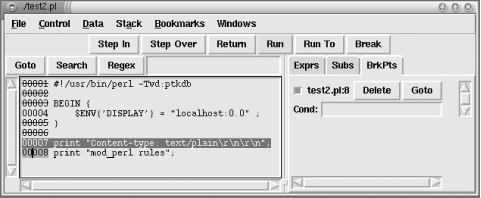
Access the web page with the browser and request the script as usual.
The ptkdb window should appear on the monitor if
you have correctly set the $ENV{'DISPLAY'}
variable (see Figure 21-2). At this point you can
start debugging your script. Be aware that the browser may time out
waiting for the script to run.
Figure 21-2. Devel::ptkdb Interactive Debugger
To expedite debugging you may want to set your breakpoints in advance
with a .ptkdbrc file and use the
$DB::no_stop_at_start variable. For debugging web
scripts, you may have to have the .ptkdbrc file
installed in the server account's home directory
(e.g., ~httpd) or whatever username the web
server is running under. Also try installing a
.ptkdbrc file in the same directory as the
target script.
21.5.8. Noninteractive Perl Debugging Under mod_perl
To debug
scripts running under mod_perl
noninteractively (i.e., to print the Perl execution trace), simply
set the usual environment variables that control debugging.
The NonStop debugger option enables you to get some
decent debugging information when running under mod_perl. For
example, before starting the server:
Now watch /tmp/db.out for
line:filename information. This is most useful
for tracking those core dumps that normally leave us guessing, even
with a stack trace from gdb, which
we'll discuss later. db.out
will show you what Perl code triggered the core dump. Refer to the
perldebug manpage for more
PERLDB_OPTS options.
Say we execute a simple Apache::Registryscript,
test.pl:
use strict;
my $r = shift;
$r->send_http_header("text/plain");
$r->print("Hello");
The generated trace found in /tmp/db.out is too
long to be printed here in its entirety. We will show only the part
that actually executes the handler created on the fly by
Apache::Registry:
You can see how Perl executes this script—first the
send_http_header( ) function is executed, then the
string "Hello" is printed.
21.5.9. Interactive mod_perl Debugging
Now we'll look at how the
interactive debugger is used in a mod_perl environment. The
Apache::DB module available from
CPAN provides a wrapper around
perldb for debugging Perl code running under
mod_perl.
The server must be run in non-forking (single-process) mode to use
the interactive debugger; this mode is turned on by passing the
-X flag to the
httpd executable. It is
convenient to use an IfDefinesection around the
Apache::DB configuration; the example below does
this using the name PERLDB. With this setup,
debugging is turned on only when starting the server with the
httpd -X -DPERLDB command.
This configuration section should be placed before any other Perl
code is pulled in, so that debugging symbols will be inserted into
the syntax tree, triggered by the call to
Apache::DB->init. The
Apache::DB::handler can be configured using any of
the Perl*Handler directives. In this case we use a
PerlFixupHandler so handlers in the response
phase will bring up the debugger prompt:
Since we have used
"/" as the
argument to the Location directive, the debugger
will be invoked for any kind of request, but of course it will
immediately quit unless there is some Perl module registered to
handle these requests.
In our first example, we will debug the standard
Apache::Status module, which is configured like
this:
When the server is started with the debugging flag, a notice will be
printed to the console:
panic% ./httpd -X -DPERLDB
[notice] Apache::DB initialized in child 950
The debugger prompt will not be available until the first request is
made (in our case, to
http://localhost/perl-status). Once we are at
the prompt, all the standard debugging commands are available. First
we run window to get some of the context for the
code being debugged, then we move to the next statement after a value
has been assigned to $r, and finally we print the
request URI. If no breakpoints are set, the
continue command will give control back to
Apache and the request will finish with the
Apache::Status main menu showing in the browser
window:
Loading DB routines from perl5db.pl version 1.07
Emacs support available.
Enter h or `h h' for help.
Apache::Status::handler(.../5.6.1/i386-linux/Apache/Status.pm:55):
55: my($r) = @_;
DB<1> w
52 }
53
54 sub handler {
55= => my($r) = @_;
56: Apache->request($r); #for Apache::CGI
57: my $qs = $r->args || "";
58: my $sub = "status_$qs";
59: no strict 'refs';
60
61: if($qs =~ s/^(noh_\w+).*/$1/) {
DB<1> n
Apache::Status::handler(.../5.6.1/i386-linux/Apache/Status.pm:56):
56: Apache->request($r); # for Apache::CGI
DB<1> p $r->uri
/perl-status
DB<2> c
All the techniques we saw while debugging plain Perl scripts can be
applied to this debugging session.
Debugging
Apache::Registry
scripts is somewhat different, because the handler routine does quite
a bit of work before it reaches your script. In this example, we make
a request for /perl/test.pl, which consists of
the code shown in Example 21-8.
Example 21-8. test.pl
use strict;
my $r = shift;
$r->send_http_header('text/plain');
print "mod_perl rules";
When a request is issued, the debugger stops at line 28 of
Apache/Registry.pm. We set a breakpoint at line
140, which is the line that actually calls the script wrapper
subroutine. The continue command will bring us
to that line, where we can step into the script handler:
Apache::Registry::handler(.../5.6.1/i386-linux/Apache/Registry.pm:28):
28: my $r = shift;
DB<1> b 140
DB<2> c
Apache::Registry::handler(.../5.6.1/i386-linux/Apache/Registry.pm:140):
140: eval { &{$cv}($r, @_) } if $r->seqno;
DB<2> s
Apache::ROOT::perl::test_2epl::handler((eval 87):3):
3: my $r = shift;
Notice the funny package name—it's generated
from the URI of the request, for namespace protection. The filename
is not displayed, since the code was compiled via eval(
), but the print command can be used to
show you $r->filename:
DB<2> n
Apache::ROOT::perl::test_2epl::handler((eval 87):4):
4: $r->send_http_header('text/plain');
DB<2> p $r->filename
/home/httpd/perl/test.pl
The line number might seem off too, but the
window command will give you a better idea of
where you are:
DB<4> w
1: package Apache::ROOT::perl::test_2epl;use Apache qw(exit);
sub handler { use strict;
2
3: my $r = shift;
4= => $r->send_http_header('text/plain');
5
6: print "mod_perl rules";
7
8 }
9 ;
The code from the test.pl file is between lines
2 and 7. The rest is the Apache::Registry magic to
cache your code inside a handlersubroutine.
It will always take some practice and patience when putting together
debugging strategies that make effective use of the interactive
debugger for various situations. Once you have a good strategy, bug
squashing can actually be quite a bit of fun!
21.5.9.1. ptkdb and interactive mod_perl debugging
As we saw earlier, we can use the
ptkdb visual debugger to debug CGI scripts running
under mod_cgi. At the time of writing it works partially under
mod_perl as well. It hangs after the first run, so you have to kill
it manually every time. Hopefully it will work completely with
mod_perl in the future.
However, ptkdb won't work for
mod_perl using the same configuration as used in mod_cgi. We have to
tweak the Apache/DB.pm module to use
Devel/ptkdb.pm instead of
Apache/perl5db.pl.
Open the file in your favorite editor and replace:
require 'Apache/perl5db.pl';
with:
require Devel::ptkdb;
Now when you use the interactive mod_perl debugger configuration from
the previous section and issue a request, the
ptkdb visual debugger will be loaded.
If you are debugging Apache::Registryscripts, as
in the terminal debugging mode example, go to line 140 (or to
whatever line number at which the eval { &{$cv}($r, @_)
} if$r->seqno;statement is located)
and press the step in button to start debugging
the script itself.
Note that you can use Apache with ptkdb in plain
multi-server mode; you don't have to start
httpd with the -X option.