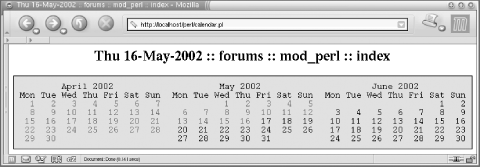
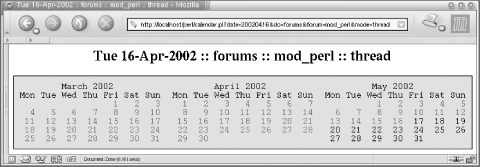
Figure 13-2. After clicking on the date April 16, 2002
In both figures you can see a title (which can be pretty much
anything) that can be passed when some link in the calendar is
clicked. When we go through the actual script that presents the
calendar we will show this in detail.
As you can see from the figures, you can move backward and forward in
time by clicking on the righthand or lefthand month. If you currently
have a calendar showing Mar-Apr-May, by clicking on some day in
March, you will get a calendar of Feb-Mar-Apr, and if you click on
some day in May you will see Apr-May-Jun.
Most users will want to browse recent data from the
forums—especially the current month and probably the previous
month. Some users will want to browse older archives, but these users
would be a minority.
Since the generation of the calendar is quite an expensive operation,
it makes sense to generate the current and previous
months' calendars at server startup and then reuse
them in all the child processes. We also want to cache any other
items generated during the requests.
In order to appreciate the results of the benchmark presented at the
end of this section, which show the benefits of caching for this
application, it's important to understand how the
application works. Therefore, let's explain the code
first.
First we create a new package and load Date::Calc:
package Book::Calendar;
use Date::Calc ( );
Date::Calc, while a quite bloated module, is very
useful for working with dates.
We have two caches, one for one-month text calendars
(%TXT_CAL_CACHE, where we will cache the output of
Date::Calc::Calendar( )), and the other for
caching the real three-month HTML calendar components:
my %HTML_CAL_CACHE = ( );
my %TXT_CAL_CACHE = ( );
The following variable controls the last day the current
month's calendar was updated in the cache. We will
explain this variable (which serves as a flag) in a moment.
my $CURRENT_MONTH_LAST_CACHED_DAY = 0;
The debug constant allows us to add some debug statements and keep
them in the production code:
use constant DEBUG => 1;
All the code that is executed if DEBUG is true:
warn "foo" if DEBUG;
will be removed at compile time by Perl when DEBUG
is made false (in production, for example).
This code prebuilds each month's calendar from three
months back to one month forward. If this module is loaded at server
startup, pre-caching will happen automatically and data will be
shared between the children, so you save both memory and time. If you
think that you need more months cached, just adjust this pre-caching
code.
my ($cyear,$cmonth) = Date::Calc::Today( );
for my $i (-3..1) {
    my($year, $month) =
        Date::Calc::Add_Delta_YMD($cyear, $cmonth, 1, 0, $i, 0);
    my $cal = '';
    get_html_calendar(\$cal, $year, $month);
}
The get_text_calendar function wraps a retrieval
of plain-text calendars generated by Date::Calc::Calendar(
), caches the generated months, and, if the month was
already cached, immediately returns it, thus saving time and CPU
cycles.
sub get_text_calendar{
    my($year, $month) = @_;
    unless ($TXT_CAL_CACHE{$year}{$month}) {
        $TXT_CAL_CACHE{$year}{$month} = Date::Calc::Calendar($year, $month);
        # remove extra new line at the end
        chomp $TXT_CAL_CACHE{$year}{$month};
    }
    return $TXT_CAL_CACHE{$year}{$month};
}
Now the main function starts.
sub get_html_calendar{
    my $r_calendar = shift;
    my $year   = shift || 1;
    my $month  = shift || 1;
get_html_calendar( ) is called with a reference to
a final calendar and the year/month of the middle month in the
calendar. Remember that the whole widget includes three months. So
you call it like this, as we saw in the pre-caching code:
my $calendar = '';
get_html_calendar(\$calendar, $year, $month);
After get_html_calendar( ) is called,
$calendar contains all the HTML needed.
Next we get the current year, month, and day, so we will know what
days should be linked. In our design, only past days and today are
linked.
my($cur_year, $cur_month, $cur_day) = Date::Calc::Today( );
The following code decides whether the
$must_update_current_month_cache flag should be
set or not. It's used to solve a problem with
calendars that include the current month. We cannot simply cache the
current month's calendar, because on the next day it
will be incorrect, since the new day will not be linked. So what we
are going to do is cache this month's day and
remember this day in the
$CURRENT_MONTH_LAST_CACHED_DAY variable, explained
later.
my $must_update_current_month_cache = 0;
for my $i (-1..1) {
    my($t_year, $t_month) =
        Date::Calc::Add_Delta_YMD($year, $month, 1, 0, $i, 0);
    $must_update_current_month_cache = 1
        if $t_year =  = $cur_year and $t_month =  = $cur_month
            and $CURRENT_MONTH_LAST_CACHED_DAY < $cur_day;
    last if $must_update_current_month_cache;
}
Now the decision logic is simple: we go through all three months in
our calendar, and if any of them is the current month, we check the
date when the cache was last updated for the current month (stored in
the $CURRENT_MONTH_LAST_CACHED_DAY variable). If
this date is less than today's date, we have to
rebuild this cache entry.
unless (exists $HTML_CAL_CACHE{$year}{$month}
        and not $must_update_current_month_cache) {
So we enter the main loop where the calendar is HTMLified and linked.
We enter this loop if:
-
There is no cached copy of the requested month.
-
There is a cached copy of the requested month, but it includes the
current month and the next date has arrived; we need to rebuild it
again, since the new day should be linked as well.
The following is the debug statement we mentioned earlier. This can
help you check that the cache works and that you actually reuse it.
If the constant DEBUG is set to a true value, the
warning will be output every time this loop is entered.
warn "creating a new calendar for $year $month\n" if DEBUG;
When we load this module at server startup, the pre-caching code we
described earlier gets executed, and we will see the following
warnings (if DEBUG is true):
creating a new calendar for 2000 9
creating a new calendar for 2000 10
creating a new calendar for 2000 11
creating a new calendar for 2000 12
creating a new calendar for 2001 1

        my @cal = ( );
Now we create three calendars, which will be stored in
@cal:
for my $i (-1..1) {
    my $id = $i+1;
As you can see, we make a loop (-1,0,1)so we can
go one month back from the requested month and one month forward in a
generic way.
Now we call Date::Calc::Add_Delta_YMD( ) to
retrieve the previous, current, or next month by providing the
requested year and month, using the first date of the month. Then we
add zero years, $i months, and zero days. Since
$i loops through the values
(-1, 0, 1),
we get the previous, current, and next months:
my ($t_year, $t_month) =
    Date::Calc::Add_Delta_YMD($year, $month, 1, 0, $i, 0);
Next, we get the text calendar for a single month. It will be cached
internally by get_text_calendar( ) if it
wasn't cached already:
$cal[$id] = get_text_calendar($t_year, $t_month);
The following code determines whether the requested month is the
current month (present), a month from the past, or the month in the
future. That's why the decision variable has three
possible values: -1, 0, and
1 (past, present, and future, respectively). We
will need this flag when we decide whether a day should be linked or
not.
my $yearmonth = sprintf("%0.4d%0.2d", $t_year, $t_month);
my $cur_yearmonth = sprintf("%0.4d%0.2d", $cur_year, $cur_month);

# tri-state: ppf (past/present/future)
my $ppf = $yearmonth <=> $cur_yearmonth;
  # If    $yearmonth =  = $cur_yearmonth, $ppf = 0;
  # elsif $yearmonth < $cur_yearmonth,  $ppf = -1;
  # elsif $yearmonth > $cur_yearmonth,  $ppf = 1;
This regex is used to substitute days in the textual calendar
returned by Date::Calc::Calendar( ) with links:
$cal[$id] =~ s{(\s\d|\b\d\d)\b}
              {link_days($1, $yearmonth, $ppf, $cur_day)}eg;
It means: "Find a space followed by a digit, or find
two digits (in either case with no adjoining digits), and replace
what we've found with the result of the
link_days( )subroutine call."
The e option tells Perl to execute the
substitution expression—i.e., to call link_days(
)—and the g option tells Perl to
perform the substitution for every match found in the source string.
Note that word boundaries are zero-width assertions (they
don't match any text) and are needed to ensure that
we don't match the year digits. You can see them in
the first line of the calendar:
           May 2002
  Mon Tue Wed Thu Fri Sat Sun
            1   2   3   4   5
    6   7   8   9  10  11  12
   13  14  15  16  17  18  19
   20  21  22  23  24  25  26
   27  28  29  30  31
The link_days( )subroutine will add HTML links
only to dates that aren't in the future.
This line closes the for loop:
}
This code constructs an HTML table with three calendars and stores it
in the cache. We use <pre> ... </pre>
blocks to preserve the textual layout of the calendar:
# cache the HTML calendar for future use
$HTML_CAL_CACHE{$year}{$month} =
qq{
 <table border="0" cellspacing="0"
  cellpadding="1" bgcolor="#000000">
   <tr>
     <td>
       <table border="0" cellspacing="0"
        cellpadding="10" bgcolor="#ccccff">
         <tr>
           <td valign="top"><pre>$cal[0]</pre></td>
           <td valign="top"><pre>$cal[1]</pre></td>
           <td valign="top"><pre>$cal[2]</pre></td>
         </tr>
       </table>
     </td>
   </tr>
 </table>
};
If the $must_update_current_month_cache flag was
turned on, the current month is re-processed, since a new day just
started. Therefore, we update the
$CURRENT_MONTH_LAST_CACHED_DAY with the current
day, so that the next request in the same day will use the cached
data:
# update the last cached day in the current month if needed
$CURRENT_MONTH_LAST_CACHED_DAY = $cur_day
    if $must_update_current_month_cache;
This line signals that the conditional block where the calendar was
created is over:
}
Regardless of whether the calendar is created afresh or was already
cached, we provide the requested calendar component by assigning it
to a variable in the caller namespace, via the reference. The goal is
for just this last statement to be executed and for the cache to do
the rest:
$$r_calendar = $HTML_CAL_CACHE{$year}{$month};

  } # end of sub calendar
Note that we copy the whole calendar component and
don't just assign the reference to the cached value.
The reason for doing this lies in the fact that this calendar
component's HTML text will be adjusted to the
user's environment and will render the cached entry
unusable for future requests. In a moment we will get to
customize_calendar( ), which adjusts the calendar
for the user environment.
This is the function that was called in the second part of the
regular expression:
sub link_days {
    my ($token, $yearmonth, $ppf, $cur_day) = @_;
It accepts the matched space digit or two digits. We kept the space
character for days 1 to 9 so that the calendar is nicely aligned. The
function is called as:
link_days($token, 200101, $ppf, $cur_day);
where the arguments are the token (e.g., ' 2' or
'31' or possibly something else), the year and the
month concatenated together (to be used in a link), the
past/present/future month flag, and finally the current
date's day, which is relevant only if we are working
in the current month.
We immediately return unmodified non-days tokens and break the token
into two characters in one statement. Then we set the
$fill variable to a single space character if the
token included days below 10, or set it to an empty string.
$day actually includes the date (1-31).
return $token unless my($c1, $c2) = $token =~ /^(\s|\d)(\d)$/;
my ($fill, $day) = ($c1 =~ /\d/) ? ('', $c1.$c2) : ($c1, $c2) ;
The function is not supposed to link days in future months, or days
in this month that are in the future. For days in the future the
function returns the token unmodified, which renders these days as
plain text with no link.
# don't link days in the future
return $token if $ppf =  = 1 or ($ppf =  = 0 and $day > $cur_day);
Finally, those tokens that reach this point get linked. The link is
constructed of the [URL] placeholder, the date
arguments, and the [PARAMS] placeholder. The
placeholders will be replaced with real data at runtime.
return qq{$fill<a href="[URL]?date=$yearmonth}.
       sprintf("%0.2d", $day).
       qq{&[PARAMS]" class="nolink">$day</a>};
The a tag's
nolink class attribute will be used by the client
code to render the links with no underlining, to make the calendar
more visually appealing. The nolink class must be
defined in a Cascading Style Sheet (CSS). Be careful,
though—this might not be a very good usability technique, since
many people are used to links that are blue and underlined.
This line conludes the link_days( ) function:
} # end of sub link_days
The customize_calendar( )subroutine takes a
reference to a string of HTML (our calendar component, for example)
and replaces the placeholders with the data we pass it. We do an
efficient one-pass match and replace for both placeholders using the
hash lookup trick. If you want to add more placeholders later, all
that's needed is to add a new placeholder name to
the %map hash:
# replace the placeholders with live data
# customize_calendar(\$calendar,$url,$params);
#######################
sub customize_calendar {
    my $r_calendar = shift;
    my $url        = shift || '';
    my $params     = shift || '';
    my %map = (
        URL    => $url,
        PARAMS => $params,
    );
    $$r_calendar =~ s/\[(\w+)\]/$map{$1}/g;

} # end of sub calendar
The module ends with the usual true statement to make
require( ) happy:
1;