12.12. When One Machine Is Not Enough for Your RDBMS DataBase and mod_perl
Imagine a scenario
where you start your business as a small service providing a web
site. After a while your business becomes very popular, and at some
point you realize that it has outgrown the capacity of your machine.
Therefore, you decide to upgrade your current machine with lots of
memory, a cutting-edge, super-expensive CPU, and an ultra-fast hard
disk. As a result, the load goes back to normal—but not for
long. Demand for your services keeps on growing, and just a short
time after you've upgraded your machine, once again
it cannot cope with the load. Should you buy an even more powerful
and very expensive machine, or start looking for another solution?
Let's explore the possible solutions for this
problem.
A typical web service consists of two main software components: the
database server and the web server.
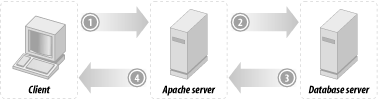
A typical user-server interaction consists of accepting the query
parameters entered into an HTML form and submitted to the web server
by a user, converting these parameters into a database query, sending
it to the database server, accepting the results of the executed
query, formatting them into a nice HTML page, and sending it to a
user's Internet browser or another application that
created the request (e.g., a mobile phone with WAP browsing
capabilities). This process is depicted in Figure 12-9.
Figure 12-9. Typical user-server interaction
This schema is known as a three-tier
architecture in the computing world. In a three-tier
architecture, you split up several processes of your computing
solution between different machines:
Tier 1
The client, who will see the data on its screen and can give
instructions to modify or process the data. In our case, an Internet
browser.
Tier 2
The application server, which does the actual processing of the data
and sends it back to the client. In our case, a mod_perl-enabled
Apache server.
Tier 3
The database server, which stores and retrieves all the data for the
application server.
We are interested only in the second and the third tiers; we
don't specify user machine requirements, since
mod_perl is all about server-side programming. The only thing the
client should be able to do is to render the generated HTML from the
response, which any simple browser will do.
12.12.1. Server Requirements
Let's first
look at what kind of software the
web and database servers are, what they need to run fast, and what
implications they have on the rest of the system software.
The three important machine components are the hard disk, the amount
of RAM, and the CPU type. Typically, the mod_perl server is mostly
RAM-hungry, while the SQL database server mostly needs a very fast
hard disk. Of course, if your mod_perl process reads a lot from the
disk (a quite infrequent phenomenon) you will need a fast disk too.
And if your database server has to do a lot of sorting of big tables
and do lots of big table joins, it will need a lot of RAM too.
If we specified average virtual requirements for each machine,
that's what we'd get.
An "ideal" mod_perl machine would
have:
HD
Low-end (no real I/O, mostly logging)
RAM
The more, the better
CPU
Medium to high (according to needs)
An "ideal" database server machine
would have:
HD
High-end
RAM
Large amounts (for big joins, sorting of many records), small amounts
otherwise
CPU
Medium to high (according to needs)
12.12.2. The Problem
With the
database and the web server on the same
machine, you have conflicting interests.
During peak loads, Apache will spawn more processes and use RAM that
the database server might have been using, or that the kernel was
using on its behalf in the form of a cache. You will starve your
database of resources at the time when it needs those resources the
most.
Disk I/O contention produces the biggest time issue. Adding another
disk won't cut I/O times, because the database is
the only thing that does I/O—mod_perl processes have all their
code loaded in memory (we are talking about code that does pure Perl
and SQL processing). Thus, it's clear that the
database is I/O- and CPU-bound (it's RAM-bound only
if there are big joins to make), while mod_perl is mostly CPU- and
memory-bound.
There is a problem, but it doesn't mean that you
cannot run the application and the web servers on the same machine.
There is a very high degree of parallelism in modern PC architecture.
The I/O hardware is helpful here. The machine can do many things
while a SCSI subsystem is processing a command or the network
hardware is writing a buffer over the wire.
If a process is not runnable (that is, it is blocked waiting for I/O
or something else), it is not using significant CPU time. The only
CPU time that will be required to maintain a blocked process is the
time it takes for the operating system's scheduler
to look at the process, decide that it is still not runnable, and
move on to the next process in the list. This is hardly any time at
all. If there are two processes, one of which is blocked on I/O and
the other of which is CPU-bound, the blocked process is getting 0%
CPU time, the runnable process is getting 99.9% CPU time, and the
kernel scheduler is using the rest.
12.12.3. The Solution
The solution is to add another machine, which allows a setup where
both the database and the web server run on their own dedicated
machines.
This solution has the following advantages:
Flexible hardware requirements
It allows you to scale two requirements independently.
If your httpd processes are heavily weighted
with respect to RAM consumption, you can easily add another machine
to accommodate more httpd processes, without
changing your database machine.
If your database is CPU-intensive but your httpd
doesn't need much CPU time, you can get a low-end
machine for the httpd and a high-end machine
with a very fast CPU for the database server.
Scalability
Since your web server doesn't depend on the database
server location any more, you can add more web servers hitting the
same database server, using the existing infrastructure.
Database security
Once you have multiple web server boxes, the backend database becomes
a single point of failure, so it's a good idea to
shield it from direct Internet access—something that is harder
to do when the web and database servers reside on the same machine.
It also has the following disadvantages:
Network latency
A database request from a web server to a database server running on
the same machine uses Unix sockets, not the TCP/IP sockets used when
the client submits the query from another machine. Unix sockets are
very fast, since all the communications happen within the same box,
eliminating network delays. TCP/IP socket communication totally
depends on the quality and the speed of the network that connects the
two machines.
Basically, you can have almost the same client-server speed if you
install a very fast and dedicated network between the two machines.
It might impose a cost of additional NICs, but that cost is probably
insignificant compared to the speed improvement you gain.
Even the normal network that you have would probably fit as well,
because the network delays are probably much smaller than the time it
takes to execute the query. In contrast to the previous paragraph,
you really want to test the added overhead here, since the network
can be quite slow, especially at peak hours.
How do you know what overhead is a significant one? All you have to
measure is the average time spent in the web server and the database
server. If either of the two numbers is at least 20 times bigger than
the added overhead of the network, you are all set.
To give you some numbers, if your query takes about 20 milliseconds
to process and only 1 millisecond to deliver the results,
it's good. If the delivery takes about half of the
time the processing takes, you should start considering switching to
a faster and/or dedicated network.
The consequences of a slow network can be quite bad. If the network
is slow, mod_perl processes remain open, waiting for data from the
database server, and eat even more RAM as new child processes pop up
to handle new requests. So the overall machine performance can be
worse than it was originally, when you had just a single machine for
both servers.

12.12.4. Three Machine Model
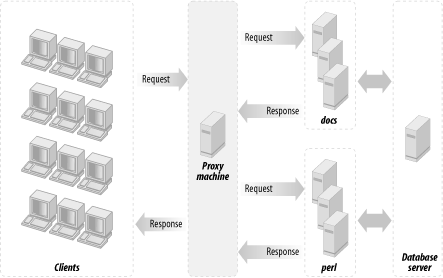
Since we are talking about using a dedicated
machine for each server, you might consider adding a third machine to
do the proxy work; this will make your setup even more flexible, as
it will enable you to proxypass all requests not just to one
mod_perl-running box, but to many of them. This will enable you to do
load balancing if and when you need it.
Generally, the proxy machine can be very light when it serves just a
little traffic and mainly proxypasses to the mod_perl processes. Of
course, you can use this machine to serve the static content; the
hardware requirement will then depend on the number of objects you
have to serve and the rate at which they are requested.