Contents


On-line Guides
All Guides
Linux for Beginners
Office Productivity
Linux Installation
Linux Security
Linux Utilities
Linux Virtualization
Linux Kernel
System/Network Admin
Programming
Scripting Languages
Development Tools
Web Development
GUI Toolkits/Desktop
Databases
Mail Systems

How To Guides
Xen Virtualization
General System Admin
Linux Security
Linux Filesystems
Web Servers
Graphics & Desktop
PC Hardware
Problem Solutions


SUSE Linux Enterprise Desktop (SLED 10) KDE Guide
Previous Page Home Next Page

15.0 Transferring Data from the Internet

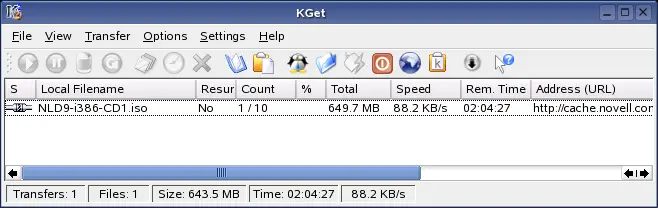
KGet is the download manager for KDE. It manages your transfers in a window. You can stop, resume, delete, queue, and add transfers. Start KGet from the main menu or by pressing Alt F2 then entering kget.

When KGet is started for the first time, you can choose to have it integrated with Konqueror. If you integrate KGet with Konqueror, KGet is added to the system tray as an icon with a downward arrow. Click this arrow to view KGet transfers.

Figure 15-1 KGet

SUSE Linux Enterprise Desktop (SLED 10) KDE Guide
Previous Page Home Next Page


  Published Courtesy of Novell, Inc. Design by Interspire