Now let's talk about a totally new feature of
mod_perl 2.0: input/output filtering.
As of this writing the mod_perl filtering API hasn't
been finalized, and it's possible that it will
change by the time the production version of mod_perl 2.0 is
released. However, most concepts presented here
won't change, and you should find the discussion and
the examples useful for understanding how filters work. For the most
up-to-date documentation, refer to http://perl.apache.org/docs/2.0/user/handlers/filters.html.
25.3.1. I/O Filtering Concepts
Before introducing the mod_perl filtering API, there are several
important concepts to understand.
25.3.1.1. Two methods for manipulating data
As discussed in
the last chapter, Apache 2.0 considers all incoming and outgoing data
as chunks of information, disregarding their kind and source or
storage methods. These data chunks are stored in buckets, which form
bucket brigades. Input and output filters massage the data in the
bucket brigades.
mod_perl 2.0 filters can directly manipulate the bucket brigades or
use the simplified streaming interface,
where the filter
object acts like a file handle, which can be read from and printed
to.
Even though you don't have to work with bucket
brigades directly, since you can write filters using the simplified,
streaming filter interface (which works with bucket brigades behind
the scenes), it's still important to understand
bucket brigades. For example, you need to know that an output filter
will be invoked as many times as the number of bucket brigades sent
from an upstream filter or a content handler, and that the
end-of-stream indicator (EOS) is sometimes sent in a separate bucket
brigade, so it shouldn't be a surprise if the filter
is invoked even though no real data went through.
You will also need to understand how to manipulate bucket brigades if
you plan to implement protocol modules, as you have seen earlier in
this chapter.
25.3.1.2. HTTP request versus connection filters
HTTP request filters are applied when
Apache serves an HTTP request.
HTTP request input filters get invoked on the body of the HTTP
request only if the body is consumed by the content handler. HTTP
request headers are not passed through the HTTP request input
filters.
HTTP response output filters get invoked on the body of the HTTP
response, if the content handler has generated one. HTTP response
headers are not passed through the HTTP response output filters.
Connection-level filters are applied at the connection level.
A connection may be configured to serve one or more HTTP requests, or
handle other protocols. Connection filters see all the incoming and
outgoing data. If an HTTP request is served, connection filters can
modify the HTTP headers and the body of the request and response. Of
course, if a different protocol is served over the connection (e.g.,
IMAP), the data could have a completely different pattern than the
HTTP protocol (headers and body).
Apache supports several other filter types that mod_perl 2.0 may
support in the future.
25.3.1.3. Multiple invocations of filter handlers
Unlike other Apache handlers, filter
handlers may get invoked more than once during the same request.
Filters get invoked as many times as the number of bucket brigades
sent from the upstream filter or content provider.
For example, if a content-generation handler sends a string, and then
forces a flush, following with more data:
Apache will generate one bucket brigade with two buckets
(there are several types of buckets that contain data—one of
them is transient):
bucket type data
----------------------
1st transient foo
2nd flush
and send it to the filter chain. Then, assuming that no more data was
sent after print("bar"), it will create a last
bucket brigade containing data:
bucket type data
----------------------
1st transient bar
and send it to the filter chain. Finally it'll send
yet another bucket brigade with the EOS bucket indicating that no
more will be data sent:
bucket type data
----------------------
1st eos
In our example the filter will be invoked three times. Notice that
sometimes the EOS bucket comes attached to the last bucket brigade
with data and sometimes in its own bucket brigade. This should be
transparent to the filter logic, as we will see shortly.
A user may install an upstream filter, and that filter may decide to
insert extra bucket brigades or collect all the data in all bucket
brigades passing through it and send it all down in one brigade.
What's important to remember when coding a filter is
to never assume that the filter is always going to be invoked once,
or a fixed number of times. You can't make
assumptions about the way the data is going to come in. Therefore, a
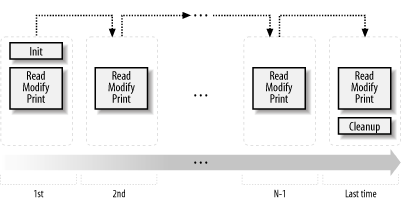
typical filter handler may need to split its logic into three parts,
as depicted in Figure 25-4.
Figure 25-4. mod_perl 2.0 filter logic
Jumping ahead, we will show some pseudocode that represents all three
parts. This is what a typical filter looks like:
sub handler {
my $filter = shift;
# runs on first invocation
unless ($filter->ctx) {
init($filter);
$filter->ctx(1);
}
# runs on all invocations
process($filter);
# runs on the last invocation
if ($filter->seen_eos) {
finalize($filter);
}
return Apache::OK;
}
sub init { ... }
sub process { ... }
sub finalize { ... }
Let's examine the parts of this pseudofilter:
Initialization
During the initialization, the filter runs all
the code that should be performed only once across multiple
invocations of the filter (during a single request). The filter
context is used to accomplish this task. For each new request, the
filter context is created before the
filter is called for the first time, and it's
destroyed at the end of the request. When the filter is invoked for
the first time, $filter->ctx returns
undef and the custom function init(
) is called:
This function can, for example, retrieve some configuration data set
in httpd.conf or initialize some data structure
to its default value. To make sure that init( )
won't be called on the following invocations, we
must set the filter context before the first invocation is completed:
$filter->ctx(1);
In practice, the context is not just served as a flag, but used to
store real data. For example, the following filter handler counts the
number of times it was invoked during a single request:
sub handler {
my $filter = shift;
my $ctx = $filter->ctx;
$ctx->{invoked}++;
$filter->ctx($ctx);
warn "filter was invoked $ctx->{invoked} times\n";
return Apache::DECLINED;
}
Since this filter handler doesn't consume the data
from the upstream filter, it's important that this
handler returns Apache::DECLINED, so that mod_perl
will pass the bucket brigades to the next filter. If this handler
returns Apache::OK, the data will simply be lost.
Processing
The next part:
process($filter);
is unconditionally invoked on every filter invocation. This is where
the incoming data is read, modified, and sent out to the next filter
in the filter chain. Here is an example that lowers the case of the
characters passing through:
use constant READ_SIZE => 1024;
sub process {
my $filter = shift;
while ($filter->read(my $data, READ_SIZE)) {
$filter->print(lc $data);
}
}
Here the filter operates on only a single bucket brigade. Since it
manipulates every character separately, the logic is really simple.
In more complicated filters, the filters may need to buffer data
first before the transformation can be applied. For example, if the
filter operates on HTML tokens (e.g., <img
src="me.jpg">), it's possible that one
brigade will include the beginning of the token
(<img ) and the remainder of the token
(src="me.jpg" >) will come in the next bucket
brigade (on the next filter invocation). In certain cases it may
involve more than two bucket brigades to get the whole token, and the
filter will have to store the remainder of the unprocessed data in
the filter context and then reuse it in the next invocation. Another
good example is a filter that performs data compression (compression
usually is effective only when applied to relatively big chunks of
data)—if a single bucket brigade doesn't
contain enough data, the filter may need to buffer the data in the
filter context until it collects enough of it.
Finalization
Finally, some filters need to know when they
are invoked for the last time, in order to perform various cleanups
and/or flush any remaining data. As mentioned earlier, Apache
indicates this event by a special end-of-stream token, represented by
a bucket of type EOS. If the filter is using the streaming interface,
rather than manipulating the bucket brigades directly, it can check
whether this is the last time it's invoked using the
$filter->seen_eos method:
if ($filter->seen_eos) {
finalize($filter);
}
This check should be done at the end of the filter handler, because
sometimes the EOS token comes attached to the tail of data (the last
invocation gets both the data and the EOS token) and sometimes it
comes all alone (the last invocation gets only the EOS token). So if
this test is performed at the beginning of the handler and the EOS
bucket was sent in together with the data, the EOS event may be
missed and the filter won't function properly.
Filters that directly manipulate bucket brigades have to look for a
bucket whose type is EOS for the same reason.
Some filters may need to deploy all three parts of the described
logic. Others will need to do only initialization and processing, or
processing and finalization, while the simplest filters might perform
only the normal processing (as we saw in the example of the filter
handler that lowers the case of the characters going through it).
25.3.1.4. Blocking calls
All filters (excluding the core filter
that reads from the network and the core filter that writes to it)
block at least once when invoked. Depending on whether
it's an input or an output filter, the blocking
happens when the bucket brigade is requested from the
upstream filter or when the bucket brigade is passed to the next
filter.
Input and output filters differ in the ways they acquire the bucket
brigades (which include the data that they filter). Although the
difference can't be seen when a streaming API is
used, it's important to understand how things work
underneath.
When an input filter is invoked, it first asks the upstream filter
for the next bucket brigade (using the get_brigade(
) call). That upstream filter in turn asks for the bucket
brigade from the next upstream filter in the chain, and so on, until
the last filter that reads from the network (called
core_in) is reached. The
core_in filter reads, using a socket, a portion of
the incoming data from the network, processes it, and sends it to its
downstream filter, which processes the data and sends it to its
downstream filter, and so on, until it reaches the very first filter
that asked for the data. (In reality, some other handler triggers the
request for the bucket brigade (e.g., the HTTP response handler or a
protocol module), but for our discussion it's good
enough to assume that it's the first filter that
issues the get_brigade( ) call.)
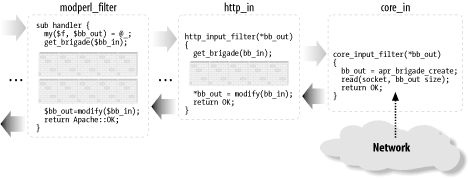
Figure 25-5 depicts a typical input filter chain
data flow, in addition to the program control flow. The arrows show
when the control is switched from one filter to another, and the
black-headed arrows show the actual data flow. The diagram includes
some pseudocode, both in Perl for the mod_perl filters and in C for
the internal Apache filters. You don't have to
understand C to understand this diagram. What's
important to understand is that when input filters are invoked they
first call each other via the get_brigade( ) call
and then block (notice the brick walls in the diagram), waiting for
the call to return. When this call returns, all upstream filters have
already completed their filtering tasks.
Figure 25-5. mod_perl 2.0 input filter program control and data flow
As mentioned earlier, the streaming interface hides these details;
however, the first call to $filter->read( )
will block, as underneath it performs the get_brigade(
) call.
Figure 25-5 shows a part of the actual input filter
chain for an HTTP request. The ... shows that
there are more filters in between the mod_perl filter and
http_in.
Now let's look at what happens in the output filter
chain. The first filter acquires the bucket brigades containing the
response data from the content handler (or another protocol handler
if we aren't talking HTTP), then it applies any
modifications and passes the data to the next filter (using the
pass_brigade( ) call), which in turn applies its
modifications and sends the bucket brigade to the next filter, and so
on, all the way down to the last filter (called
core), which writes the data to the network, via
the socket to which the client is listening. Even though the output
filters don't have to wait to acquire the bucket
brigade (since the upstream filter passes it to them as an argument),
they still block in a similar fashion to input filters, because they
have to wait for the pass_brigade( ) call to
return.
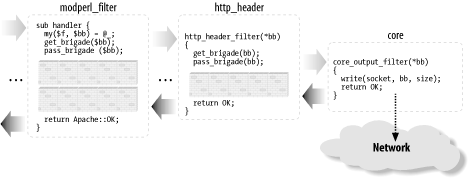
Figure 25-6 depicts a typical output filter chain
data flow in addition to the program control flow. As in the input
filter chain diagram, the arrows show the program control flow, and
the black-headed arrows show the data flow. Again, the diagram uses
Perl pseudocode for the mod_perl filter and C pseudocode for the
Apache filters, and the brick walls represent the blocking. The
diagram shows only part of the real HTTP response filter chain;
... stands for the omitted filters.
Figure 25-6. mod_perl 2.0 output filter program control and data flow
25.3.2. Filter Configuration
HTTP request filter
handlers are declared using the
FilterRequestHandler attribute. Consider the
following request input and output filter skeletons:
package Book::FilterRequestFoo;
use base qw(Apache::Filter);
sub input : FilterRequestHandler {
my($filter, $bb, $mode, $block, $readbytes) = @_;
#...
}
sub output : FilterRequestHandler {
my($filter, $bb) = @_;
#...
}
1;
If the attribute is not specified, the default
FilterRequestHandler attribute is assumed. Filters
specifying subroutine attributes must subclass
Apache::Filter.
The request filters are usually configured in the
<Location> or equivalent sections:
Now we have the request input and output filters configured.
The connection filter handler uses the
FilterConnectionHandler attribute. Here is a
similar example for the connection input and output filters:
package Book::FilterConnectionBar;
use base qw(Apache::Filter);
sub input : FilterConnectionHandler {
my($filter, $bb, $mode, $block, $readbytes) = @_;
#...
}
sub output : FilterConnectionHandler {
my($filter, $bb) = @_;
#...
}
1;
This time the configuration must be done outside the
<Location> or equivalent sections, usually
within the <VirtualHost>section or the
global server configuration:
Let's say that we want to test how our handlers
behave when they are requested as HEAD requests
rather than GET requests. We can alter the request
headers at the incoming connection level transparently to all
handlers.
This example's filter handler looks for data like:
GET /perl/test.pl HTTP/1.1
and turns it into:
HEAD /perl/test.pl HTTP/1.1
The input filter handler that does that by directly manipulating the
bucket brigades is shown in Example 25-5.
Example 25-5. Book/InputFilterGET2HEAD.pm
package Book::InputFilterGET2HEAD;
use strict;
use warnings;
use base qw(Apache::Filter);
use APR::Brigade ( );
use APR::Bucket ( );
use Apache::Const -compile => 'OK';
use APR::Const -compile => ':common';
sub handler : FilterConnectionHandler {
my($filter, $bb, $mode, $block, $readbytes) = @_;
return Apache::DECLINED if $filter->ctx;
my $rv = $filter->next->get_brigade($bb, $mode, $block, $readbytes);
return $rv unless $rv = = APR::SUCCESS;
for (my $b = $bb->first; $b; $b = $bb->next($b)) {
my $data;
my $status = $b->read($data);
return $status unless $status = = APR::SUCCESS;
warn("data: $data\n");
if ($data and $data =~ s|^GET|HEAD|) {
my $bn = APR::Bucket->new($data);
$b->insert_after($bn);
$b->remove; # no longer needed
$filter->ctx(1); # flag that that we have done the job
last;
}
}
Apache::OK;
}
1;
The filter handler is called for each bucket brigade, which in turn
includes buckets with data. The basic task of any input filter
handler is to request the bucket brigade from the upstream filter,
and return it to the downstream filter using the second argument,
$bb. It's important to remember
that you can call methods on this argument, but you
shouldn't assign to this argument, or the chain will
be broken. You have two techniques to choose from to retrieve,
modify, and return bucket brigades:
Create a new, empty bucket brigade, $ctx_bb, pass
it to the upstream filter via get_brigade( ), and
wait for this call to return. When it returns,
$ctx_bb is populated with buckets. Now the filter
should move the bucket from $ctx_bb to
$bb, on the way modifying the buckets if needed.
Once the buckets are moved, and the filter returns, the downstream
filter will receive the populated bucket brigade.
Pass $bb to get_brigade( ) to
the upstream filter, so it will be populated with buckets. Once
get_brigade( ) returns, the filter can go through
the buckets and modify them in place, or it can do nothing and just
return (in which case, the downstream filter will receive the bucket
brigade unmodified).
Both techniques allow addition and removal of buckets, alhough the
second technique is more efficient since it doesn't
have the overhead of creating the new brigade and moving the bucket
from one brigade to another. In this example we have chosen to use
the second technique; in the next example we will see the first
technique.
Our filter has to perform the substitution of only one HTTP header
(which normally resides in one bucket), so we have to make sure that
no other data gets mangled (e.g., there could be
POST ed data that may match
/^GET/ in one of the buckets). We use
$filter->ctx as a flag here. When
it's undefined, the filter knows that it
hasn't done the required substitution; once it
completes the job, it sets the context to 1.
To optimize the speed, the filter immediately returns
Apache::DECLINED when it's
invoked after the substitution job has been done:
return Apache::DECLINED if $filter->ctx;
mod_perl then calls get_brigade( ) internally,
which passes the bucket brigade to the downstream filter.
Alternatively, the filter could do:
my $rv = $filter->next->get_brigade($bb, $mode, $block, $readbytes);
return $rv unless $rv = = APR::SUCCESS;
return Apache::OK if $filter->ctx;
but this is a bit less efficient.
If the job hasn't yet been done, the filter calls
get_brigade( ), which populates the
$bb bucket brigade. Next, the filter steps through
the buckets, looking for the bucket that matches the regex
/^GET/. If it finds it, a new bucket is created
with the modified data s/^GET/HEAD/, and that
bucket is inserted in place of the old bucket. In our example, we
insert the new bucket after the bucket that we have just modified and
immediately remove the bucket that we don't need any
more:
$b->insert_after($bn);
$b->remove; # no longer needed
Finally, we set the context to 1, so we know not
to apply the substitution on the following data and break from the
for loop.
The handler returns Apache::OK, indicating that
everything was fine. The downstream filter will receive the bucket
brigade with one bucket modified.
Now let's check that the handler works properly.
Consider the response handler shown in Example 25-6.
Example 25-6. Book/RequestType.pm
package Book::RequestType;
use strict;
use warnings;
use Apache::RequestIO ( );
use Apache::RequestRec ( );
use Apache::Response ( );
use Apache::Const -compile => 'OK';
sub handler {
my $r = shift;
$r->content_type('text/plain');
my $response = "the request type was " . $r->method;
$r->set_content_length(length $response);
$r->print($response);
Apache::OK;
}
1;
This handler returns to the client the request type it has issued. In
the case of the HEAD request, Apache will discard
the response body, but it will still set the correct
Content-Length header, which will be 24 in case of
a GET request and 25 for HEAD.
Therefore, if this response handler is configured as:
which means that the body was discarded by Apache, because our filter
turned the GET request into a
HEAD request. If Apache wasn't
discarding the body of responses to HEAD requests,
the response would be:
the request type was HEAD

That's why the content length is reported as 25 and
not 24, as in the real GET
request.
Let's look at the request input filter that lowers
the case of the text in the request's body,
Book::InputRequestFilterLC (shown in Example 25-7).
Example 25-7. Book/InputRequestFilterLC.pm
package Book::InputRequestFilterLC;
use strict;
use warnings;
use base qw(Apache::Filter);
use Apache::Connection ( );
use APR::Brigade ( );
use APR::Bucket ( );
use Apache::Const -compile => 'OK';
use APR::Const -compile => ':common';
sub handler : FilterRequestHandler {
my($filter, $bb, $mode, $block, $readbytes) = @_;
my $c = $filter->c;
my $bb_ctx = APR::Brigade->new($c->pool, $c->bucket_alloc);
my $rv = $filter->next->get_brigade($bb_ctx, $mode, $block, $readbytes);
return $rv unless $rv = = APR::SUCCESS;
while (!$bb_ctx->empty) {
my $b = $bb_ctx->first;
$b->remove;
if ($b->is_eos) {
$bb->insert_tail($b);
last;
}
my $data;
my $status = $b->read($data);
return $status unless $status = = APR::SUCCESS;
$b = APR::Bucket->new(lc $data) if $data;
$bb->insert_tail($b);
}
Apache::OK;
}
1;
As promised, in this filter handler we have used the first technique
of bucket-brigade modification. The handler creates a temporary
bucket brigade (ctx_bb), populates it with data
using get_brigade( ), and then moves buckets from
it to the bucket brigade $bb, which is then
retrieved by the downstream filter when our handler returns.
This filter doesn't need to know whether it was
invoked for the first time with this request or whether it has
already done something. It's a stateless handler,
since it has to lowercase everything that passes through it. Notice
that this filter can't be used as a connection
filter for HTTP requests, since it will invalidate the incoming
request headers. For example, the first header line:
GET /perl/TEST.pl HTTP/1.1
will become:
get /perl/test.pl http/1.1
which messes up the request method, the URL, and the protocol.
Now if we use the Book::Dump response handler we
developed earlier in this chapter, which dumps the query string and
the content body as a response, and configure the server as follows:
panic% echo "mOd_pErl RuLeS" | POST 'http://localhost:8002/lc_input?FoO=1&BAR=2'
we get a response like this:
args:
FoO=1&BAR=2
content:
mod_perl rules
We can see that our filter lowercased the POST ed
body before the content handler received it, and the query string
wasn't changed.
25.3.3.3. Stream-based HTTP request input filter
Let's now look at the same filter implemented using
the stream-based filtering API (see Example 25-8).
Example 25-8. Book/InputRequestFilterLC2.pm
package Book::InputRequestFilterLC2;
use strict;
use warnings;
use base qw(Apache::Filter);
use Apache::Const -compile => 'OK';
use constant BUFF_LEN => 1024;
sub handler : FilterRequestHandler {
my $filter = shift;
while ($filter->read(my $buffer, BUFF_LEN)) {
$filter->print(lc $buffer);
}
Apache::OK;
}
1;
You've probably asked yourself why we had to go
through the bucket-brigade filters when all this can be done so much
more easily. The reason is that we wanted you to understand how the
filters work underneath, which will help you when you need to debug
filters or optimize their speed. Also, in certain cases a
bucket-brigade filter may be more efficient than a stream-based one.
For example, if the filter applies a transformation to selected
buckets, certain buckets may contain open file handles or pipes,
rather than real data. When you call read( ) the
buckets will be forced to read in that data, but if you
don't want to modify these buckets, you can pass
them as they are and let Apache use a faster technique for sending
data from the file handles or pipes.
The logic is very simple here: the filter reads in a loop and prints
the modified data, which at some point (when the internal mod_perl
buffer is full or when the filter returns) will be sent to the next
filter.
read( ) populates $buffer to a
maximum of BUFF_LEN characters (1,024 in our
example). Assuming that the current bucket brigade contains 2,050
characters, read( ) will get the first 1,024
characters, then 1,024 characters more, and finally the remaining two
characters. Notice that even though the response handler may have
sent more than 2,050 characters, every filter invocation operates on
a single bucket brigade, so you have to wait for the next invocation
to get more input. In one of the earlier examples, we showed that you
can force the generation of several bucket brigades in the content
handler by using rflush( ). For example:
It's possible to get more than one bucket brigade
from the same filter handler invocation only if the filter is not
using the streaming interface—simply call get_brigade(
) as many times as needed or until the EOS token is
received.
The configuration section is pretty much identical:
% echo "mOd_pErl RuLeS" | POST 'http://localhost:8002/lc_input2?FoO=1&BAR=2'
we get a response like this:
args:
FoO=1&BAR=2
content:
mod_perl rules
Again, we can see that our filter lowercased the
POST ed body before the content handler received
it. The query string wasn't changed.
25.3.4. Output Filters
Earlier, in Figure 25-6, we saw how output filters
call each other. Now let's look at some examples of
output filters.
25.3.4.1. Stream-based HTTP request output filter
The PerlOutputFilterHandler handler registers and configures
output filters.
The example of a stream-based output filter that we are going to
present is simpler than the one that directly manipulates bucket
brigades, although internally the stream-based interface is still
manipulating the bucket brigades.
Book::FilterROT13 implements the simple
Caesar-cypher encryption that replaces each English letter with the
one 13 places forward or back along the alphabet, so that
"mod_perl 2.0 rules!" becomes
"zbq_crey 2.0 ehyrf!". Since the
English alphabet consists of 26 letters, the ROT13 encryption is
self-inverse, so the same code can be used for encoding and decoding.
In our example, Book::FilterROT13 reads portions
of the output generated by some previous handler, rotates the
characters and sends them downstream.
The first argument to the filter handler is an
Apache::Filter object, which as of this writing
provides two methods, read( ) and print(
). The read( ) method reads a chunk of
the output stream into the given buffer, returning the number of
characters read. An optional size argument may be given to specify
the maximum size to read into the buffer. If omitted, an arbitrary
number of characters (which depends on the size of the bucket brigade
sent by the upstream filter or handler) will fill the buffer. The
print( ) method passes data down to the next
filter. This filter is shown in Example 25-9.
Example 25-9. Book/FilterROT13.pm
package Book::FilterROT13;
use strict;
use Apache::RequestRec ( );
use Apache::RequestIO ( );
use Apache::Filter ( );
use Apache::Const -compile => 'OK';
use constant BUFF_LEN => 1024;
sub handler {
my $filter = shift;
while ($filter->read(my $buffer, BUFF_LEN)) {
$buffer =~ tr/A-Za-z/N-ZA-Mn-za-m/;
$filter->print($buffer);
}
return Apache::OK;
}
1;
Let's say that we want to encrypt the output of the
registry scripts accessed through a /perl-rot13
location using the ROT13 algorithm. The following configuration
section accomplishes that:
Now that you know how to write input and output filters, you can
write a pair of filters that decode ROT13 input before the request
processing starts and then encode the generated response back to
ROT13 on the way back to the client.
The request output filter can be used as the connection output filter
as well. However, HTTP headers will then look invalid to standard
HTTP user agents. The client should expect the data to come encoded
as ROT13 and decode it before using it. Writing such a client in Perl
should be a trivial task.
25.3.4.2. Another stream-based HTTP request output filter
Let's look at another example of an HTTP request
output filter—but first, let's develop a
response handler that sends two lines of output: the numerals
1234567890 and the English alphabet in a single string. This handler
is shown in Example 25-10.
Example 25-10. Book/SendAlphaNum.pm
package Book::SendAlphaNum;
use strict;
use warnings;
use Apache::RequestRec ( );
use Apache::RequestIO ( );
use Apache::Const -compile => qw(OK);
sub handler {
my $r = shift;
$r->content_type('text/plain');
$r->print(1..9, "0\n");
$r->print('a'..'z', "\n");
Apache::OK;
}
1;
The purpose of our filter handler is to reverse every line of the
response body, preserving the newline characters in their places.
Since we want to reverse characters only in the response body,
without breaking the HTTP headers, we will use an HTTP request output
filter.
The first filter implementation (Example 25-11) uses
the stream-based filtering API.
Example 25-11. Book/FilterReverse1.pm
package Book::FilterReverse1;
use strict;
use warnings;
use base qw(Apache::Filter);
use Apache::Const -compile => qw(OK);
use constant BUFF_LEN => 1024;
sub handler : FilterRequestHandler {
my $filter = shift;
while ($filter->read(my $buffer, BUFF_LEN)) {
for (split "\n", $buffer) {
$filter->print(scalar reverse $_);
$filter->print("\n");
}
}
Apache::OK;
}
1;
Next, we add the following configuration to
httpd.conf:
Now when a request to /reverse1 is made, the
response handler Book::SendAlphaNum::handler( )
sends:
1234567890
abcdefghijklmnopqrstuvwxyz
as a response and the output filter handler
Book::FilterReverse1::handler reverses the lines,
so the client gets:
0987654321
zyxwvutsrqponmlkjihgfedcba
The Apache::Filter module loads the read(
) and print( ) methods that encapsulate
the stream-based filtering interface.
The reversing filter is quite simple: in the loop it reads the data
in the readline( ) mode in chunks up to the buffer
length (1,024 in our example), then it prints each line reversed
while preserving the newline control characters at the end of each
line. Behind the scenes, $filter->read( )
retrieves the incoming brigade and gets the data from it, and
$filter->print( ) appends to the new brigade,
which is then sent to the next filter in the stack. read(
) breaks the while loop when the brigade
is emptied or the EOS token is received.
So as not to distract the reader from the purpose of the example,
we've used oversimplified code that
won't correctly handle input lines that are longer
than 1,024 characters or use a different line-termination token (it
could be "\n",
"\r", or
"\r\n", depending on the platform).
Moreover, a single line may be split across two or even more bucket
brigades, so we have to store the unprocessed string in the filter
context so that it can be used in the following invocations. So here
is an example of a more complete handler, which does takes care of
these issues:
sub handler {
my $f = shift;
my $leftover = $f->ctx;
while ($f->read(my $buffer, BUFF_LEN)) {
$buffer = $leftover . $buffer if defined $leftover;
$leftover = undef;
while ($buffer =~ /([^\r\n]*)([\r\n]*)/g) {
$leftover = $1, last unless $2;
$f->print(scalar(reverse $1), $2);
}
}
if ($f->seen_eos) {
$f->print(scalar reverse $leftover) if defined $leftover;
}
else {
$f->ctx($leftover) if defined $leftover;
}
return Apache::OK;
}
The handler uses the $leftover variable to store
unprocessed data as long as it fails to assemble a complete line or
there is an incomplete line following the newline token. On the next
handler invocation, this data is then prepended to the next chunk
that is read. When the filter is invoked for the last time, it
unconditionally reverses and flushes any remaining data.
Now when a request to /reverse2 is made, the
client gets:
0987654321
zyxwvutsrqponmlkjihgfedcba
as expected.
The bucket brigades output filter version is just a bit more
complicated than the stream-based one. The handler receives the
incoming bucket brigade $bb as its second
argument. Because when it is completed, the handler must pass a
brigade to the next filter in the stack, we create a new bucket
brigade, into which we put the modified buckets and which eventually
we pass to the next filter.
The core of the handler is in removing buckets from the head of the
bucket brigade $bb one at a time, reading the data
from each bucket, reversing the data, and then putting it into a
newly created bucket, which is inserted at the end of the new bucket
brigade. If we see a bucket that designates the end of the stream, we
insert that bucket at the tail of the new bucket brigade and break
the loop. Finally, we pass the created brigade with modified data to
the next filter and return.
As in the original version of
Book::FilterReverse1::handler, this filter is not
smart enough to handle incomplete lines. The trivial exercise of
making the filter foolproof by porting a better matching rule and
using the $leftover buffer from the previous
section is left to the reader.
25.2. New Apache Phases and Corresponding Perl*Handlers