9.4. Apache::Status and Measuring Code Memory Usage
The Apache::Status module allows
you to peek inside the Perl interpreter in the Apache web server. You
can watch the status of the Perl interpreter: what modules and
Registry scripts are compiled in, the content of variables, the sizes
of the subroutines, and more.
To
configure this module you should add the
following section to your httpd.conf file:
Now when you access the location
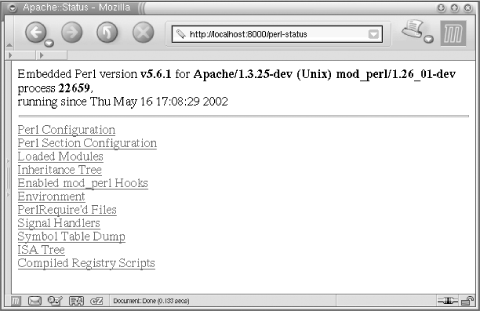
http://localhost:8000/perl-status you will see a
menu (shown in Figure 9-1) that leads you into
various sections that will allow you to explore the innards of the
Perl interpreter.
Figure 9-1. Main menu for Apache::Status
When you use this module for
debugging, it's best
to run the web server in single-server mode (httpd
-X). If you don't you can get confused,
because various child processes might show different information.
It's simpler to work with a single process.
To enable the Apache::Status modules to present
more exotic information, make sure that the following modules are
installed: Data::Dumper,
Apache::Peek, Devel::Peek,
B::LexInfo, B::Deparse,
B::Terse, and B::TerseSize.
Some of these modules are bundled with Perl; others should be
installed by hand.
When you have the aforementioned modules installed, add these
directives to your httpd.conf file:
PerlSetVar StatusOptionsAll On
PerlSetVar StatusDumper On
PerlSetVar StatusPeek On
PerlSetVar StatusLexInfo On
PerlSetVar StatusDeparse On
PerlSetVar StatusDeparseOptions "-p -sC"
PerlSetVar StatusTerse On
PerlSetVar StatusTerseSize On
PerlSetVar StatusTerseSizeMainSummary On
and restart Apache. Alternatively, if you enable all the options, you
can use the option StatusOptionsAll to replace all
the options that can be On or
Off, so you end up with just these two lines:
PerlSetVar StatusOptionsAll On
PerlSetVar StatusDeparseOptions "-p -sC"
When you explore the contents of the compiled Perl module or Registry
script, at the bottom of the screen you will see a Memory Usage link.
When you click on it, you will be presented with a list of funtions
in the package. For each function, the size and the number of OP
codes will be shown.
For example, let's create a module that prints the
contents of the %ENV hash. This module is shown in
Example 9-6.
Example 9-6. Book/DumpEnv.pm
package Book::DumpEnv;
use strict;
use Apache::Constants qw(:common);
sub handler {
shift->send_http_header('text/plain');
print map {"$_ => $ENV{$_}\n"} keys %ENV;
return OK;
}
1;
Restart the server in single-server mode (httpd
-X), request the URL
http://localhost:8000/dumpenv, and you will see
that the contents of %ENV are displayed.
Now it's time to peek inside the
Book::DumpEnv package inside the Perl interpreter.
Issue the request to
http://localhost:8000/perl-status, click on the
"Loaded Modules" menu item, and
locate Book::DumpEnv on the displayed page. Click
on it to request a page at the URI
http://localhost:8000/perl-status?Book::DumpEnv.
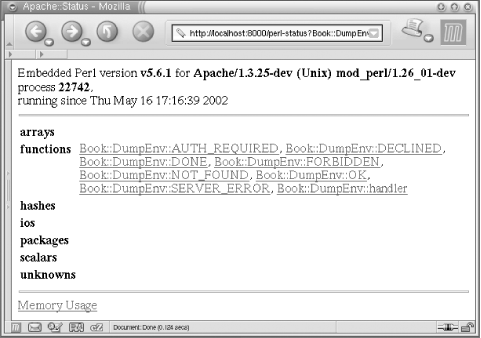
You will see the screen shown in Figure 9-2.
Figure 9-2. Data structures compiled in the module
You can see seven functions that were imported with:
use Apache::Constants qw(:common);
and a single function that we have created, called
handler. No other Perl variable types were created
in the package Book::DumpEnv.
Now click on the "Memory Usage"
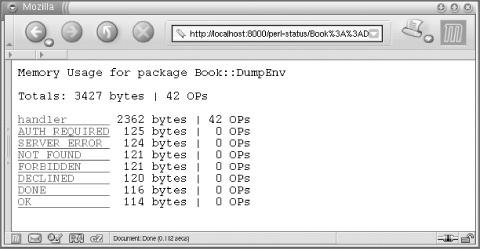
link at the bottom of the page. The screen shown in Figure 9-3 will be rendered.
Figure 9-3. Book::DumpEnv memory usage
So you can see that Book::DumpEnv takes 3,427
bytes in memory, whereas the handler function
takes 2,362 bytes.
Is this all? No, we can go even further inside the code and learn the
syntax tree size (i.e., what opcodes construct each line of the
source code and how many bytes each source-code line consumes). If we
click on handler we will see the syntax tree of
this function, and how much memory each Perl OPcode and line of code
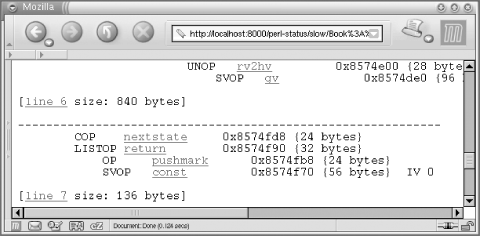
take. For example, in Figure 9-4 we can see that
line 7, which corresponds to this source-code line in
Book/DumpEnv.pm:
7: return OK;
takes up 136 bytes of memory.

Figure 9-4. Per line and Perl OPcode memory usage
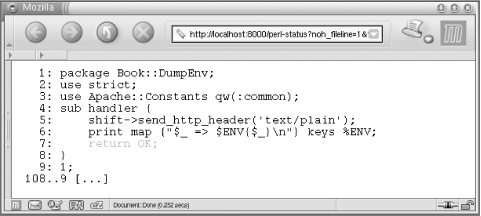
We found the corresponding source-code line by clicking the
"line 7" hyperlink shown in Figure 9-4, which displays the source code of the module
with the relevant line highlighted (see Figure 9-5).
Figure 9-5. Source code corresponding to the OPcodes
Now you should be able to to find out how much memory each
subroutine or even each individual
source line of Perl code consumes. This will allow you to optimize
memory usage by comparing several implemenations of the same
algorithm and choosing the one that consumes the smallest amount
of memory.