Contents


On-line Guides
All Guides
Linux for Beginners
Office Productivity
Linux Installation
Linux Security
Linux Utilities
Linux Virtualization
Linux Kernel
System/Network Admin
Programming
Scripting Languages
Development Tools
Web Development
GUI Toolkits/Desktop
Databases
Mail Systems

How To Guides
Xen Virtualization
General System Admin
Linux Security
Linux Filesystems
Web Servers
Graphics & Desktop
PC Hardware
Problem Solutions


NOTE: CentOS Enterprise Linux is built from the Red Hat Enterprise Linux source code. Other than logo and name changes CentOS Enterprise Linux is compatible with the equivalent Red Hat version. This document applies equally to both Red Hat and CentOS Enterprise Linux.

2.12. Saving the File

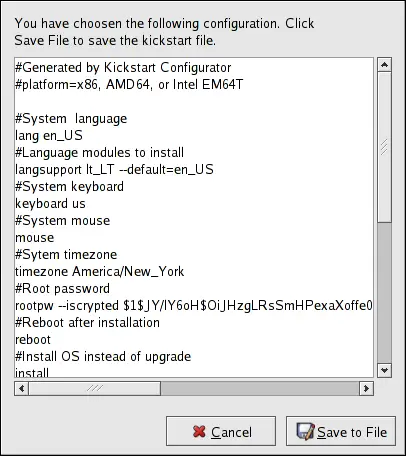
To review the contents of the kickstart file after you have finished choosing your kickstart options, select File => Preview from the pull-down menu.

Figure 2-17. Preview

To save the kickstart file, click the Save to File button in the preview window. To save the file without previewing it, select File => Save File or press [Ctrl]-[S]. A dialog box appears. Select where to save the file.

After saving the file, refer to Section 1.10 Starting a Kickstart Installation for information on how to start the kickstart installation.

 
 
  Published under the terms of the GNU General Public License Design by Interspire