NOTE: CentOS Enterprise Linux is built from the Red Hat Enterprise Linux source code. Other than logo and name changes CentOS Enterprise Linux is compatible with the equivalent Red Hat version. This document applies equally to both Red Hat and CentOS Enterprise Linux.
Red Hat Cluster Suite: Configuring and Managing a Cluster
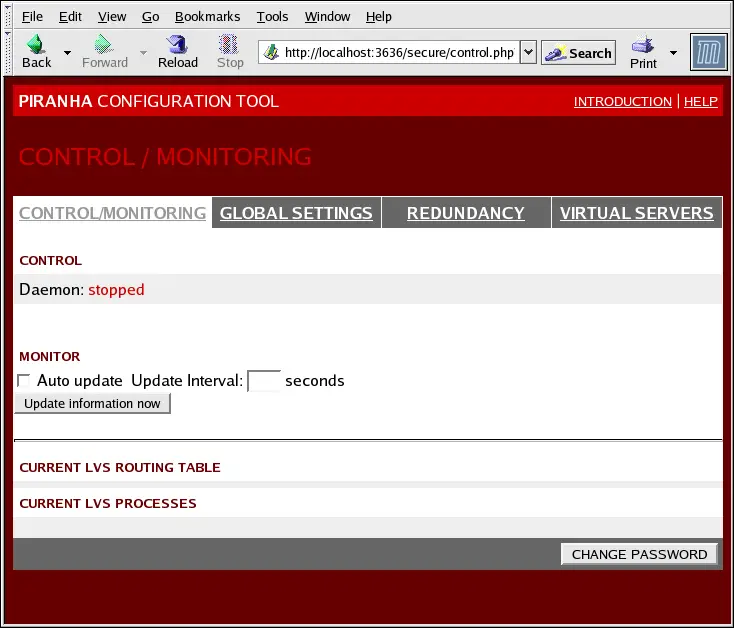
The CONTROL/MONITORING Panel presents the cluster
administrator with a limited runtime status of the cluster. It displays
the status of the pulse daemon, the LVS routing
table, and the LVS-spawned nanny processes.
Note
The fields for CURRENT LVS ROUTING TABLE and
CURRENT LVS PROCESSES remain blank until you
actually start the cluster, as shown in Section 10.8 Starting the Cluster.
Figure 10-2. The CONTROL/MONITORING Panel
Auto update
The status display on this page can be updated automatically
at a user configurable interval. To enable this feature, click on
the Auto update checkbox and set the desired
update frequency in the Update frequency in
seconds text box (the default value is 10 seconds).
It is not recommended that you set the automatic update to
an interval less than 10 seconds. Doing so may make it difficult
to reconfigure the Auto update interval
because the page will update too frequently. If you encounter
this issue, simply click on another panel and then back on
CONTROL/MONITORING.
The Auto update feature does not work
with all browsers, such as Mozilla.

Update information now
You can manually update the status information
manually by clicking this button.
CHANGE PASSWORD
Clicking this button takes you to a help screen with
information on how to change the administrative password for the
Piranha Configuration Tool.