Popup Windows: scrollbars
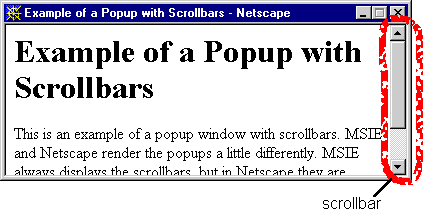
By default popups don't have scroll bars. This is a problem if the content of the popup takes up more space than the first page. It's usually a good idea to set the popup with scroll bars. Set the popup with scroll bars by setting the
scrollbars property to
yes.
So, for example, this open() command in the
popup script
opens a popup with scrollbars:
window.open(href, windowname, 'width=400,height=150,scrollbars=yes');
which gives us this popup.
In situations where a scrollbar isn't actually needed because the content doesn't fill up even a single window, MSIE and Netscape handle things a little differently. MSIE puts a greyed out scroll bar, Netscape doesn't put any scroll bar at all. Neither of them puts a horizontal scroll bar in the window if it is not needed.










