Attribute for <AREA ...>
onClick = "script command(s)"
| Usage Recommendation |
|---|
| use it, but don't rely on it |
Like
<A onClick="..."> and
<INPUT onClick="...">,
<AREA onClick="..."> performs a dual function: it allows you to run a script when the users clicks on the area, and it allows you to cancel the action that click would otherwise have performed.
In its simplest use, onClick runs a script when the user clicks on the area. For example, the following code brings up an alert box when the user clicks on the Freelance area:
<AREA HREF="freelance.html" ALT="Freelance"
    COORDS="31,0,164,26" SHAPE=RECT
    onClick="alert('That was a click')">
which gives us the onClick in the Freelance area:
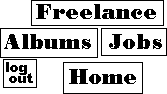
If onClick returns a false value then the click is cancelled. For example, you might want to check if the user really wants to follow the link. By returning the value of a confirm() command you can cancel or allow the click based on the user's response:
<AREA HREF="logout.html" ALT="Log Out"
    COORDS="3,59,37,88" SHAPE=RECT
    onClick="return confirm('Are you sure you want to log out?')">
which gives us the onClick in the Logout area:










