Contents


On-line Guides
All Guides
Linux for Beginners
Office Productivity
Linux Installation
Linux Security
Linux Utilities
Linux Virtualization
Linux Kernel
System/Network Admin
Programming
Scripting Languages
Development Tools
Web Development
GUI Toolkits/Desktop
Databases
Mail Systems
Book Store

How To Guides
Virtualization
General System Admin
Linux Security
Linux Filesystems
Web Servers
Graphics & Desktop
PC Hardware
Windows
Problem Solutions


SHAPE = RECT

Looking for info on how to make an image map?

See our tutorial How to Make an Image Map
SHAPE=RECT indicates that the area is a rectangle. For a rectangle the COORDS attribute consists of two pairs of x/y coordinates. The first pair sets the coordinates of the upper left corner of the rectangle. The second pair sets the coordinates of the lower right corner.

For example, suppose the upper left is at 6,116 and the lower right is at 97,184:
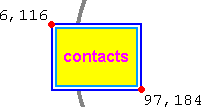
test map rectangle

We would use the following code to indicate the shape. Note that commas separate all the numbers in COORDS, not within pairs.

<AREA 
   HREF="contacts.html" ALT="Contacts" TITLE="Contacts"
   SHAPE=RECT COORDS="6,116,  97,184">

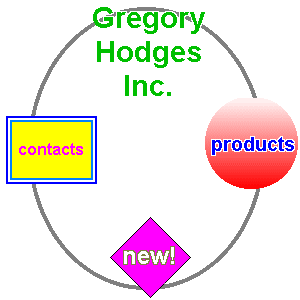
which gives us the rectangle in this map:

Contacts Products New! map of GH site


  Copyright 1997-2002 Idocs inc. Published under the terms of the Open Content License Design by Interspire