Contents


On-line Guides
All Guides
Linux for Beginners
Office Productivity
Linux Installation
Linux Security
Linux Utilities
Linux Virtualization
Linux Kernel
System/Network Admin
Programming
Scripting Languages
Development Tools
Web Development
GUI Toolkits/Desktop
Databases
Mail Systems
Book Store

How To Guides
Virtualization
General System Admin
Linux Security
Linux Filesystems
Web Servers
Graphics & Desktop
PC Hardware
Windows
Problem Solutions


SHAPE = POLY

Looking for info on how to make an image map?

See our tutorial How to Make an Image Map
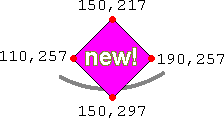
SHAPE=POLY indicates that the area is some type of polygon (i.e. a geometric shape consisting of s straight sides). For a polygon, each pair of coordinates in COORDS indicates a single corner of the polygon. The browser figures the shape by "connecting the dots" from one corner to the next.

For example, suppose the corners of the polygon are located at these coordinates:

  • 150,217
  • 190,257
  • 150,297
  • 110,257
... as shown in this diagram:

test map polygon

We would set the coordinates with code like this:

<AREA 
   HREF="new.html" ALT="New!" TITLE="New!"
   SHAPE=POLY COORDS="150,217, 190,257,  150,297,  110,257">

which gives us the diamond shape in this map:

Contacts Products New! map of GH site


  Copyright 1997-2002 Idocs inc. Published under the terms of the Open Content License Design by Interspire